I finally went ahead and purchased the SDF 2.0 Extensions for Visual Studio 2005 from OpenNetCF.org. It's only fifty bucks and you get the source code, which, for me, is mostly useful for educational purposes. I'm always wondering if my coding style, design, etc. are up to par. You can also use the free version of the SDF 2.0, which isn't crippled but doesn't include the source here. I used it for quite a while before deciding that I should support the OpenNetCF team.
Oh and by the way, the installer for the purchased version of SDF 2.0 takes about 15 minutes on my 3Ghz HT 1.5GB RAM Pentium 4 machine to complete. I was almost going to e-mail support that their installation package was broken but then I discovered the h2reg process, which is started by the installer, was just taking forever. I believe this is because of some of the integrated VS2005 stuff they've done in SDF 2.0. Note that the free version installs rather quickly.
Thursday, July 06, 2006


Tuesday, July 04, 2006
ActiveSync, A Lesson Learned
At the risk of jumping the gun here, it appears that my ActiveSync woes were not due to Microsoft's negligence or poor programming (though, I suppose, they really should have had the ActiveSync troubleshooter page much earlier, circa 4.0 or even 3.X). In fact, it was my own fault for not noticing that my IT department at work packaged BlackICE (a firewall program) with our VPN software. So, simply by installing our VPN (a rather innocuous gesture), I created a firewall that prevented TCP traffic over port 990.
Now, I'm not 100% confident that this will solve all of my ActiveSync issues but it appears that, at the moment, I've figured out the connection problem.
Now, I'm not 100% confident that this will solve all of my ActiveSync issues but it appears that, at the moment, I've figured out the connection problem.
Sunday, July 02, 2006
ActiveSync Connection Problems Continue
I finally decided to post to the ActiveSync newsgroup about my ActiveSync issues (here). Here's a copy of the post:
My laptop will not connect to any of my WM 5.0 devices (including the i-mate KJAM, the Cingular 2125, and the T-MOBILE SDA). Though I've experienced this problem in the past, I've been able to uinstall and reinstall ActiveSync 4.2 and restart my computer to solve the problem.
I've been blogging about my problematic encounters with ActiveSync for a while now but have never sought the expertise of this newsgroup. I'll provide a quick summary of my ActiveSync issues here. You can visit my blog for more details: http://csharponphone.blogspot.com/2006/05/activesync-41-sit-spin.html
Basically, I plug-in my WM 5.0 device, the little networking animation starts up in the taskbar (and says acquiring network address, etc.). This icon dissapears and then the ActiveSync icon in the taskbar turns green and starts to spin. This continues until a timeout is reached at which point I'm given a choice of visiting Microsoft's troubleshooter webpage (it then forwards me on to the "If ActiveSync Cannot Receive Data Through Port 990" page). I've tried following all of the previous advice posted here and on the web, but to no avail. My laptop is running Windows Firewall and McAfee VirusScan Enterprise 8.0.0.
Any help from MVPs, Microsoft employees, or anyone with a clue into what might be happening would be much appreciated.
NETSTAT RETURNS:
Active Connections
Proto Local Address Foreign Address State
TCP 127.0.0.1:1150 127.0.0.1:1151 ESTABLISHED
TCP 127.0.0.1:1151 127.0.0.1:1150 ESTABLISHED
TCP 192.168.2.76:1038 64.233.167.125:5222 ESTABLISHED
IP-CONFIG RETURNS:
Ethernet adapter Local Area Connection 16:
Connection-specific DNS Suffix . :
Description . . . . . . . . . . . : Windows Mobile-based Device #14
Physical Address. . . . . . . . . : 80-00-60-0F-E8-00
Dhcp Enabled. . . . . . . . . . . : Yes
Autoconfiguration Enabled . . . . : No
IP Address. . . . . . . . . . . . : 169.254.2.2
Subnet Mask . . . . . . . . . . . : 255.255.255.0
Default Gateway . . . . . . . . . :
DHCP Server . . . . . . . . . . . : 169.254.2.1
Lease Obtained. . . . . . . . . . : Sunday, July 02, 2006 1:53:41 PM
Lease Expires . . . . . . . . . . : Tuesday, August 01, 2006 1:53:41 PM
Update: 07/04/2006 11AM: Here's my follow-up to the post above:
I'm ashamed to admit this, but it never occurred to me to check my
process list to see if there was any networking software running on my
computers that I did not know about. Imagine my surprise when I saw
blackd.exe (part of the BlackICE firewall package). As soon as I
noticed this, I figured this might be the root of my problem. It seems
the company that I work for includes a custom install of the BlackICE
installation with their VPN software. I force closed the process in
Task Manager, plugged in my WM 5.0 device and, what do you know,
ActiveSync turns green immediately and says connected.
I probably would have thought of this earlier on, but ActiveSync would
occassionally work--it wasn't a consistent problem. This maybe more an
issue with BlackICE however.
Unfortunately, the install of BlackICE that I have does not include a
frontend, so I must manually edit their configuration file to open the
ActiveSync related ports (despite warnings in the file itself against
it).
So, in the end, it appears my frustration was misdirected at Microsoft.
It really should have been at my IT department for not disclosing that
BlackICE was packaged with our VPN.
Hopefully now my ActiveSync problems are solved.
My laptop will not connect to any of my WM 5.0 devices (including the i-mate KJAM, the Cingular 2125, and the T-MOBILE SDA). Though I've experienced this problem in the past, I've been able to uinstall and reinstall ActiveSync 4.2 and restart my computer to solve the problem.
I've been blogging about my problematic encounters with ActiveSync for a while now but have never sought the expertise of this newsgroup. I'll provide a quick summary of my ActiveSync issues here. You can visit my blog for more details: http://csharponphone.blogspot.com/2006/05/activesync-41-sit-spin.html
Basically, I plug-in my WM 5.0 device, the little networking animation starts up in the taskbar (and says acquiring network address, etc.). This icon dissapears and then the ActiveSync icon in the taskbar turns green and starts to spin. This continues until a timeout is reached at which point I'm given a choice of visiting Microsoft's troubleshooter webpage (it then forwards me on to the "If ActiveSync Cannot Receive Data Through Port 990" page). I've tried following all of the previous advice posted here and on the web, but to no avail. My laptop is running Windows Firewall and McAfee VirusScan Enterprise 8.0.0.
Any help from MVPs, Microsoft employees, or anyone with a clue into what might be happening would be much appreciated.
NETSTAT RETURNS:
Active Connections
Proto Local Address Foreign Address State
TCP 127.0.0.1:1150 127.0.0.1:1151 ESTABLISHED
TCP 127.0.0.1:1151 127.0.0.1:1150 ESTABLISHED
TCP 192.168.2.76:1038 64.233.167.125:5222 ESTABLISHED
IP-CONFIG RETURNS:
Ethernet adapter Local Area Connection 16:
Connection-specific DNS Suffix . :
Description . . . . . . . . . . . : Windows Mobile-based Device #14
Physical Address. . . . . . . . . : 80-00-60-0F-E8-00
Dhcp Enabled. . . . . . . . . . . : Yes
Autoconfiguration Enabled . . . . : No
IP Address. . . . . . . . . . . . : 169.254.2.2
Subnet Mask . . . . . . . . . . . : 255.255.255.0
Default Gateway . . . . . . . . . :
DHCP Server . . . . . . . . . . . : 169.254.2.1
Lease Obtained. . . . . . . . . . : Sunday, July 02, 2006 1:53:41 PM
Lease Expires . . . . . . . . . . : Tuesday, August 01, 2006 1:53:41 PM
Update: 07/04/2006 11AM: Here's my follow-up to the post above:
I'm ashamed to admit this, but it never occurred to me to check my
process list to see if there was any networking software running on my
computers that I did not know about. Imagine my surprise when I saw
blackd.exe (part of the BlackICE firewall package). As soon as I
noticed this, I figured this might be the root of my problem. It seems
the company that I work for includes a custom install of the BlackICE
installation with their VPN software. I force closed the process in
Task Manager, plugged in my WM 5.0 device and, what do you know,
ActiveSync turns green immediately and says connected.
I probably would have thought of this earlier on, but ActiveSync would
occassionally work--it wasn't a consistent problem. This maybe more an
issue with BlackICE however.
Unfortunately, the install of BlackICE that I have does not include a
frontend, so I must manually edit their configuration file to open the
ActiveSync related ports (despite warnings in the file itself against
it).
So, in the end, it appears my frustration was misdirected at Microsoft.
It really should have been at my IT department for not disclosing that
BlackICE was packaged with our VPN.
Hopefully now my ActiveSync problems are solved.
Two Inch View
Just added an RSS feed to a new blog called "The Two Inch View," which is dedicated to "Windows Mobile media and entertainment." The site design is crisp and very readable and the author has a long history with WindowsCE/Mobile (a former MVP). The site is actually sponsored by Windows Mobile, which hopefully implies a strong foundation and dedication to frequent updates. It currently has some posts on the Windows Mobile Device Center, which looks like a new skin on top of ActiveSync (and, hopefully, includes some bug fixes to ActiveSync as well).
Friday, June 30, 2006
Microsoft Bluetooth Stack
Peter Foot, who developed 32feet.net, has a list of Windows Mobile devices that use the Microsoft Bluetooth Stack (as opposed to, say, some 3rd party stack like the Widcomm stack whose SDK is cost prohibitive for most developers--and certainly most graduate students like myself).
Friday, June 23, 2006
.NET CF 2.0 SP1 Released
"Microsoft .NET Compact Framework version 2.0 SP1 release has been completed and is in the process of being released. This service pack was driven customer feedback including improvements in stability, adds new debugging features, extended platform support, and new developer functionality." (from .NET CF Team Blog)
Download it here.
Download it here.
Thursday, June 22, 2006
Sql Server 2005 Mobile
Astonishing as it now seems to me, I had not used SQL before integrating Sql Server 2005 mobile into my current project. That said, I occassionally run into these problems that could only happen to a SQL neophyte. For example, I've found out the hard way that naming your table columns either Trigger, Default or Option is a bad thing and confuses the hell out of SQL (and your development team members). Trigger, Default and Option, as I'm sure most of you know, are reserved words in Sql.
Tuesday, June 13, 2006
More ActiveSync Woes
I've had trouble with "cradling the emulator" in ActiveSync ever since I found out about this feature. In VS2005, open Tools->Device Emulator Manager. In the Emulator Manager, right click on a device and select "connect." Once the specified emulator has launched and loaded, you can right click on that device (again in the Emulator Manager) and select "cradle." This should cradle the emulator to ActiveSync so you can, for example, explore the emulator file system. However, this feature rarely works for me. Typically what happens is that after I select "cradle", the icon immediately changes (signifying that the device is indeed cradled) but ActiveSync does not respond. This seems independent of the "sit and spin" issue though as the ActiveSync icon does not change to green, nor does it animate at all. It simply stays gray.
Ah, ActiveSync, how you destroy my workday efficiency.
Update (07/12/2006 11:00AM): OK, thanks to Sriram's feedback (see Comments), I figured this out. Here are the steps (click on the images to see full size screenshots).
Step 1: Open Device Emulator Manager in VS2005 (Tools->Device Emulator Manager)
Step 2: Right click on your device of interest, start it.
Step 3: After the device has started, right click on the device again and select 'Cradle.' See Figure 1 below.
Step 4: The icon should change to represent that the device has been cradled. However, this does not necessarily mean that ActiveSync has actually connected to the device. See Figure 2 below.
Step 5: If ActiveSync has not actually connected to the device, yet the cradled icon is shown, open up ActiveSync, select File->Connection Settings. This will open up a Connection Settings Dialog. From there, click the Connect button. See Figure 3 below. This should find and connect your emulator device to ActiveSync.
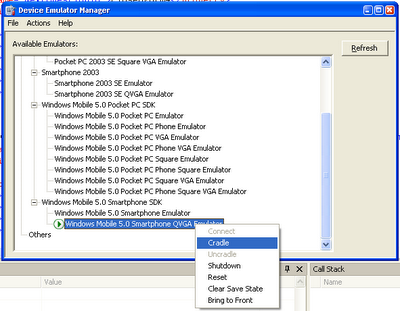 Figure 1: Cradle the emulator
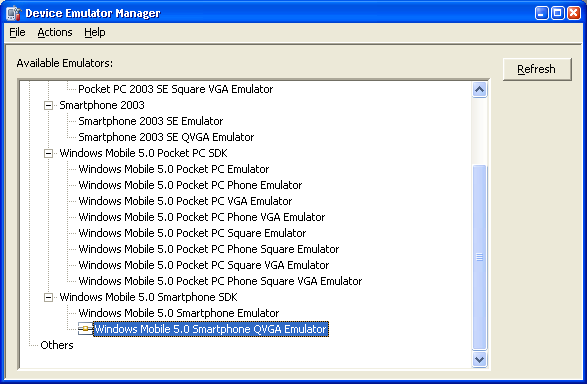 Figure 2: Emulator supposedly cradled
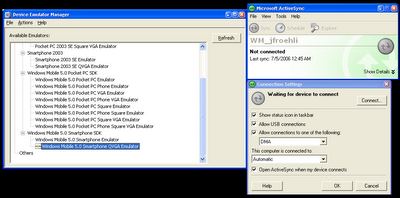 Figure 3: Open ActiveSync, click on File->Connection Settings. In the Connection Settings Dialog, click on the Connect... button. This should find your cradled emulator device.
Ah, ActiveSync, how you destroy my workday efficiency.
Update (07/12/2006 11:00AM): OK, thanks to Sriram's feedback (see Comments), I figured this out. Here are the steps (click on the images to see full size screenshots).
Step 1: Open Device Emulator Manager in VS2005 (Tools->Device Emulator Manager)
Step 2: Right click on your device of interest, start it.
Step 3: After the device has started, right click on the device again and select 'Cradle.' See Figure 1 below.
Step 4: The icon should change to represent that the device has been cradled. However, this does not necessarily mean that ActiveSync has actually connected to the device. See Figure 2 below.
Step 5: If ActiveSync has not actually connected to the device, yet the cradled icon is shown, open up ActiveSync, select File->Connection Settings. This will open up a Connection Settings Dialog. From there, click the Connect button. See Figure 3 below. This should find and connect your emulator device to ActiveSync.
 Figure 1: Cradle the emulator
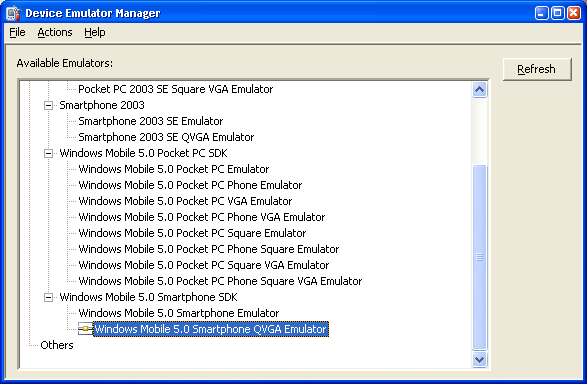 Figure 2: Emulator supposedly cradled
 Figure 3: Open ActiveSync, click on File->Connection Settings. In the Connection Settings Dialog, click on the Connect... button. This should find your cradled emulator device.
Tuesday, June 06, 2006
Installation Error, Support Info: 4
I had problems deploying and running .NET CF 2.0 applications on my i-mate K-JAM (running Windows Mobile 5.0--OS 5.1.70). I posted this message to Google Groups:
I've been unable to successfully load a small test app I've written in VS2005 and .NET CF 2.0 (C#) for the i-mate K-Jam PocketPC Phone Edition.
Mark Prentice replied with a pointer to a working solution at his blog:
I’m happy to report the workaround for the system failure, which will be included in SP1, has now also been slipstreamed into the current download. If .NET Compact Framework v2 CAB installation on a Windows Mobile 5.0 device fails with error #4 then this fix is for you. Just re-download the NETCFv2 package and re-install!
Here's a link to the .NET CF 2.0 download.
I've been unable to successfully load a small test app I've written in VS2005 and .NET CF 2.0 (C#) for the i-mate K-Jam PocketPC Phone Edition.
The error that pops up on the K-JAM when deploying and debugging from VS2005, "Installation error. Stop all applications and processes and maximize available storage space, and run installation again. Support info: 4."
If I attempt to run the app by clicking on it in the file explorer on the K-JAM, I get the error, "This application (TestPocket.exe) requires a newer version of the Microsoft .NET Compact Framework than the version installed on this device." When I click details, I get:
TestPocket.exe
InvalidProgramException
I've tried this with the target device selected as both "Windows Mobile 5.0 Pocket PC Device" and "Windows Mobile 5.0 SmartPhone Device." I receive the same error in both cases.
Mark Prentice replied with a pointer to a working solution at his blog:
I’m happy to report the workaround for the system failure, which will be included in SP1, has now also been slipstreamed into the current download. If .NET Compact Framework v2 CAB installation on a Windows Mobile 5.0 device fails with error #4 then this fix is for you. Just re-download the NETCFv2 package and re-install!
Here's a link to the .NET CF 2.0 download.
Sunday, June 04, 2006
.NET CF Menu Item Size
I'm developing an application that will be used by those with impaired vision and reduced motor control. Unfortunately, .NET CF makes it quite difficult to change font sizes for menus and menu items. In fact, MenuItem classes do not expose the Font property. In many instances, I avoid this problem because I run my application full screen--however, some messageboxes are run in "normal mode" with the menubars exposed.
Daniel Moth talks about a work around which involves modifying registry settings:
Menus (MainMenu, ContextMenu and MenuItem) are resized according to their Font. However, they do not expose a Font property, so you are stuck with whatever the default Font is for the platform. You can change that through the registry:
DWORD "Ht" for height , DWORD "Wt" for boldness: 700 or 400
same as above, but this applies to menu items rather than the menu bar
Daniel Moth talks about a work around which involves modifying registry settings:
Menus (MainMenu, ContextMenu and MenuItem) are resized according to their Font. However, they do not expose a Font property, so you are stuck with whatever the default Font is for the platform. You can change that through the registry:
HKLM\Menu\BarFntDWORD "Ht" for height , DWORD "Wt" for boldness: 700 or 400
HKLM\Menu\PopFntsame as above, but this applies to menu items rather than the menu bar
Friday, June 02, 2006
Params Keyword
The params keyword lets you specify a method parameter that takes an argument where the number of arguments is variable.
For example,
{
TestArgsMethod("Hello", " goodbye ", " hello");
TestArgsMethod("Numbers", 1, 2, 3, 4);
}
static void TestArgsMethod(String text, params Object[] args)
{
StringBuilder sb = new StringBuilder();
sb.Append(text);
foreach(Object o in args)
{
sb.Append(o.ToString());
}
Debug.WriteLine(sb.ToString());
}
Thursday, June 01, 2006
XmlReader and LineNumber
I made this post to microsoft.public.dotnet.languages.csharp but no one has responded, so I thought I'd repost it here. If you know the answer, please either leave a comment or respond in the newsgroup.
"According to the MSDN documentation within the XmlTextReader class for
.NET 2.0, the recommended practice to create XmlReader instances is
using the XmlReaderSettings class and the XmlReader.Create() method.
However, the problem is, the XmlReader class does not expose certain
properties that I need, e.g., LineNumber, LinePosition, etc. I would
like to follow Microsoft's recommended practices, but I'm not sure how
I can get XmlTextReader functionality out of XmlReader.
Update 07/12/2006 @ 1:03PM: Zafar Abbas responded with a solution,
The reader obtained via XmlReader.Create supports the IXmlLinfInfo interface
from which you can access the line properties:
"According to the MSDN documentation within the XmlTextReader class for
.NET 2.0, the recommended practice to create XmlReader instances is
using the XmlReaderSettings class and the XmlReader.Create() method.
However, the problem is, the XmlReader class does not expose certain
properties that I need, e.g., LineNumber, LinePosition, etc. I would
like to follow Microsoft's recommended practices, but I'm not sure how
I can get XmlTextReader functionality out of XmlReader.
Should I instantiate a XmlTextReader object and pass this to the
XmlReader.Create() method and then access this underlying text reader
to obtain the info I need? Or is there some way to get the
XmlReader.Create() method to return a XmlTextReader object? Or should I
ignore there suggestion and simply create an XmlTextReader object
manually and not use the XmlReader.Create() method at all.
Update 07/12/2006 @ 1:03PM: Zafar Abbas responded with a solution,
The reader obtained via XmlReader.Create supports the IXmlLinfInfo interface
from which you can access the line properties:
reader = XmlReader.Create (...)
IXmlLineInfo info = reader as IXmlLineInfo;
Console.WriteLine(info.LineNumber);
Console.WriteLine(info.LinePosition);
Monday, May 29, 2006
Windows CE != Windows Mobile
Wednesday, May 24, 2006
Alpha Blending
Since my last post was on drawing transparency color keys in .NET CF, I thought I should explore alpha blending as well. It is possible to do alpha blending .NET CF, but not without some effort (i.e., venturing into p/invoke). Here, at the .NET CF UI and More blog, the author writes:
Briefly, there are two ways to do alpha blending in WM5: the AlphaBlend() function and with the Image COM object in the Imaging API.
He then goes on to explain how to implement these two methods. (direct link). The happy alternative is offered through OpenNetCF (who else) in their SDF 2.0 library. See Alex Feinman's post here.
Transparency
This morning I googled around for "standard transparency colors" in hopes that I would find a color key that is typically used to represent transparency in images. In .NET CF, the only way to make part of an image transparent is through the following code:
ImageAttributes attr = new ImageAttributes();
attr.SetColorKey(Color.White, Color.White);
Rectangle rDest = new Rectangle(xImage, yImage, Image.Width, Image.Height);
g.DrawImage(Image, rDest, 0, 0, Image.Width, Image.Height, GraphicsUnit.Pixel, attr);
In this case, the color "white" would be made transparent in the given Image. Note that although SetColorKey allows the developer to specify a transparency color range, I believe that this range is limited to one color on .NET CF. During my search, I found that the standard chroma key is "bright pink." However, it's also convention to automatically select the chroma key based on the upper-left hand corner pixel of the image, in hopes that this is representative of the "background" pixels. Here's a post by Ed Kaim (MSFT) that really explains this well imo.
"However, the issue you're raising is why Microsoft recommends the usage of ImageAttributes in order to draw transparency, and why the top left pixel is called out as a prime source. First of all, ImageAttributes is the only feasible way to draw transparency in managed code on the .NET Compact Framework. Otherwise you'd have to go pixel by pixel and only draw the nontransparent ones, which would be slow and painful. The reason the top left pixel is offered is because it's often transparent in images with transparency. Sure, it's not *always* transparent, but it's usually transparent, due to its location in the image and the fact that most pictures on buttons don't go all the way to the top left border. However, you can decide that your standard chroma key color is bright pink (as many do) and hardcode your ImageAttributes object to use that color for all images, provided you do the work in the art to make sure the same exact color is used on the transparent spots in your files, whatever format they may be."
ImageAttributes attr = new ImageAttributes();
attr.SetColorKey(Color.White, Color.White);
Rectangle rDest = new Rectangle(xImage, yImage, Image.Width, Image.Height);
g.DrawImage(Image, rDest, 0, 0, Image.Width, Image.Height, GraphicsUnit.Pixel, attr);
In this case, the color "white" would be made transparent in the given Image. Note that although SetColorKey allows the developer to specify a transparency color range, I believe that this range is limited to one color on .NET CF. During my search, I found that the standard chroma key is "bright pink." However, it's also convention to automatically select the chroma key based on the upper-left hand corner pixel of the image, in hopes that this is representative of the "background" pixels. Here's a post by Ed Kaim (MSFT) that really explains this well imo.
"However, the issue you're raising is why Microsoft recommends the usage of ImageAttributes in order to draw transparency, and why the top left pixel is called out as a prime source. First of all, ImageAttributes is the only feasible way to draw transparency in managed code on the .NET Compact Framework. Otherwise you'd have to go pixel by pixel and only draw the nontransparent ones, which would be slow and painful. The reason the top left pixel is offered is because it's often transparent in images with transparency. Sure, it's not *always* transparent, but it's usually transparent, due to its location in the image and the fact that most pictures on buttons don't go all the way to the top left border. However, you can decide that your standard chroma key color is bright pink (as many do) and hardcode your ImageAttributes object to use that color for all images, provided you do the work in the art to make sure the same exact color is used on the transparent spots in your files, whatever format they may be."
Monday, May 22, 2006
Retrieving an Assembly's PublicKeyToken
The short of it is, use the sn -T blah.dll command (see link). Here's the step-by-step for finding the PublicKeyToken of the System.Data.SqlServerCe.dll:
1. Open up the Visual Studio 2005 Command Prompt from the Start Menu. That should set the environment for using VS2005 commands.
2. C:\>cd "C:\Program Files\Microsoft Visual Studio 8\SmartDevices\SDK\SQL Server\Mobile\v3.0\"
3. Type "sn -T System.Data.SqlServerCe.dll"
The sn utility will return something like: Public key token is 3be235df1c8d2ad3
Note: if you do not include a capital T (but instead a lowercase, -t), you will receive the following error: "Failed to convert key to token -- The public key for assembly '(null)' was invalid."
1. Open up the Visual Studio 2005 Command Prompt from the Start Menu. That should set the environment for using VS2005 commands.
2. C:\>cd "C:\Program Files\Microsoft Visual Studio 8\SmartDevices\SDK\SQL Server\Mobile\v3.0\"
3. Type "sn -T System.Data.SqlServerCe.dll"
The sn utility will return something like: Public key token is 3be235df1c8d2ad3
Note: if you do not include a capital T (but instead a lowercase, -t), you will receive the following error: "Failed to convert key to token -- The public key for assembly '(null)' was invalid."
ActiveSync 4.1, Sit & Spin
As a .NET CF developer, I'm getting quite tired of dealing with the obvious failings of ActiveSync. It is, without a doubt, one of the most frustrating programs I've been forced to deal with. I'm currently struggling with the problem where you plug-in a Windows Mobile 5.0 device to a desktop machine running ActiveSync 4.1 and ActiveSync just sits there and continuously spins the green icon while displaying "Connecting." It will literally do this for hours (if I let it). See screen below:

I've scoured the net for a solution and have found none. This has been happening off and on since I started working on Windows Mobile 5.0 devices. Unfortunately, I have not been able to diagnose the cause. Restarting the device does not solve the problem. Restarting the desktop (which I hate doing) does not solve the problem. Sometimes, moving the USB cable from one port to another works, but not always. I can waste a full hour or so simply trying to get my activesync connection up so I can debug my program. :(
Oh and the online KB has a few reported issues with regards to ActiveSync 4.1:
http://support.microsoft.com/kb/911422/en-us
http://support.microsoft.com/kb/912240/en-us
and, perhaps most relevant,
http://support.microsoft.com/kb/911423/en-us
Sadly, however, none of these quite get at the issue I am experiencing. This last link is closest but simply blames the problem on Windows Firewall (which I've disabled to see if it has any effect, it does not).
Update (05/22/2006 11:42AM): It appears that the ActiveSync 4.2 Beta Preview is now available and it comes with a USB troubleshooter. I'm going to try it now. See these two blog posts by Jason Langridge (here and here).
Update (05/24/2006 5:27PM): So far ActiveSync 4.2 has worked perfectly for me--I have not run into the "sit and spin" problem (or any problem) since upgrading.
Update (05/26/2006 1:59PM): Despite upgrading to ActiveSync 4.2 on my laptop, I still have the "sit & spin" problem when connecting to my Windows Mobile 5.0 devices. The horribly ironic thing is that the "USB troubleshooter" promised in ActiveSync 4.2 is actually just a webpage and not, say, a tool. This is so frustrating. I really can't imagine being the only one with this problem as its occurred on my desktop machines (both work, school and home) and laptop with a variety of WM 5.0 devices. I am not running any firewall except the Windows XP built-in firewall (and even when I disable it, ActiveSync still just sits there spinning).
Update (06/02/2006 9:07PM): I got my laptop to work again with ActiveSync. I uinstalled ActiveSync 4.2, restarted, and then reinstalled 4.2. Now things seem to be working for the moment. Incidentally, after this reinstall, I actually got the SmartPhone emulator to cradle via the Device Manager which has never worked for me properly. Note that my work desktop machine, which had a behaving install of ActiveSync 4.2 just stopped working today. However, like with my laptop, a full reinstall of 4.2 seemed to fix the problem.
Update (06/13/2006 10:21AM): Both my advisor and my mentor at work have run into the "sit & spin" problem. The solution of upgrading to 4.2 beta and restarting seems to solve the problem, but only temporarily. My advisor also tried to manually unblock all the ActiveSync ports in Windows Firewall; however, this did not seem to make a difference. As I've noted in the past, I've completely disabled Windows Firewall to try and debug the "sit & spin" problem and it's not made a difference, so his experiences are not surprising.
Update (06/13/2006 11:00AM): I want to reemphasize how I often solve the "sit & spin" problem as strange as it might sound. I have four USB ports on the back of my computer. If I encounter the feared continuously spinning green ActiveSync icon, I unplug my USB cord from the back of the computer and move it to another port while my WM 5.0 device is still connected to the other end. ActiveSync then appears to do some initialization (e.g., my tray shows off another icon that's animated) and then immediately connects properly. This only works for those ports in the back of my computer that have not yet had ActiveSync connections. Once I move the cord to all four ports, I must uninstall ActiveSync and start the process all over.
Update (07/02/2006 1PM): I spent a large amount of my Sunday morning and early afternoon determined once and for all to get to the bottom of the ActiveSync sit & spin problem. My laptop (Dell 710m) has Windows Firewall installed as well as McAfee VirusScan 8 and two USB ports. I tested both USB ports with two different USB cords and three different WM 5.0 devices (the i-Mate K-JAM, the Cingular 2125, and the T-Mobile SDA), all of which would not connect to my laptop, despite all efforts (see the sit & spin problem above). Once the green ActiveSync taskbar icon spins for a certain amount of time, a dialog (new to ActiveSync 4.2) asks me if I'd like to be forwarded to a troubleshooter webpage. If I select OK, I am forwarded to a page entitled "If ActiveSync Cannot Receive Data Through Port 990" (here) . The first three steps are trivial and meant to ensure that you have USB connections enabled both on the desktop and device (and yes I double and triple checked, everything looks fine in this regard). The last point (point 4), states that if I have an internet firewall, make sure its enabled to accept ActiveSync connections. Well, as previously stated, I only run Microsoft's Firewall program and upon examination, they do specifically allow connections from all ActiveSync related .exes. Just to ensure the firewall wasn't my problem, I turned it off but ran into the same problem. Finally, I uninstalled ActiveSync 4.2 and reinstalled it as directed by the USB troubleshooter here (step 9). Unfortunately, though this has worked for me in the past, uninstalling ActiveSync and rebooting my devices and desktop did not solve the problem. So, now I'm stuck. No ActiveSync and no solution. I did find a set of relatively helpful links though for ActiveSync troubleshooting (the fact that there is a community formed around this problem should say something to Microsoft, no?). Here are the links:
1. ActiveSync 4.X Troubleshooting Guide - Connection Flow - provides a very thorough look at ActiveSync issues with respect to establishing a connection (by Chris De Herrera)
2. ActiveySync 4.X Troubleshooting Guide - Firewall, VPN, Proxy Issues (also by Chris De Herrera)
3. Bev Howard's Solving ActiveSync Issues
4. TCP ports required by ActiveSync (I found this the first day I experienced the sit & spin problem, but since tweaking these ports in Windows Firewall never solved anything I never linked to it. I do so for thoroughness now).
5. ActiveSync 4.0/4.1 TroubleShooter Guide
6. The ActiveSync Troubleshooter (which 4.2 dynamically links to when a problem is encountered)
I have not seen an outpouring of complaints on the newsgroups about this problem, though this post is one of the most actively visited on my website so presumably others are encountering it as well. By a rough estimate, I figure the Microsoft ActiveSync development team owes me about 20 hours of my time (perhaps more) based on this problem alone. Others at my research lab have also spent countless hours trying to get their WM 5.0 devices to connect to ActiveSync. Now, as computer scientists we are used to tooling around and debugging programs as well as fault-prone systems. We typically can navigate around these problems. However, if ActiveSync 4.X is broken (and, imo, it is very f*ing broken) it have dramatic implications for the userbase of our WM 5.0 product. If our users can't sync their devices, then they can't (#1) install our application and (#2) use the desktop side of our application.
Update (07/02/2006 8PM): I made a post to the microsoft.public.pocketpc.activesync newsgroup about this problem (here). I also copied the post to my blog here.
Update (07/04/2006 11AM): It appears that my ActiveSync Sit & Spin issue has been resolved and in bit of probably all too common misplaced blame, it was not the fault of Microsoft as I suspected. See here and here.

I've scoured the net for a solution and have found none. This has been happening off and on since I started working on Windows Mobile 5.0 devices. Unfortunately, I have not been able to diagnose the cause. Restarting the device does not solve the problem. Restarting the desktop (which I hate doing) does not solve the problem. Sometimes, moving the USB cable from one port to another works, but not always. I can waste a full hour or so simply trying to get my activesync connection up so I can debug my program. :(
Oh and the online KB has a few reported issues with regards to ActiveSync 4.1:
http://support.microsoft.com/kb/911422/en-us
http://support.microsoft.com/kb/912240/en-us
and, perhaps most relevant,
http://support.microsoft.com/kb/911423/en-us
Sadly, however, none of these quite get at the issue I am experiencing. This last link is closest but simply blames the problem on Windows Firewall (which I've disabled to see if it has any effect, it does not).
Update (05/22/2006 11:42AM): It appears that the ActiveSync 4.2 Beta Preview is now available and it comes with a USB troubleshooter. I'm going to try it now. See these two blog posts by Jason Langridge (here and here).
Update (05/24/2006 5:27PM): So far ActiveSync 4.2 has worked perfectly for me--I have not run into the "sit and spin" problem (or any problem) since upgrading.
Update (05/26/2006 1:59PM): Despite upgrading to ActiveSync 4.2 on my laptop, I still have the "sit & spin" problem when connecting to my Windows Mobile 5.0 devices. The horribly ironic thing is that the "USB troubleshooter" promised in ActiveSync 4.2 is actually just a webpage and not, say, a tool. This is so frustrating. I really can't imagine being the only one with this problem as its occurred on my desktop machines (both work, school and home) and laptop with a variety of WM 5.0 devices. I am not running any firewall except the Windows XP built-in firewall (and even when I disable it, ActiveSync still just sits there spinning).
Update (06/02/2006 9:07PM): I got my laptop to work again with ActiveSync. I uinstalled ActiveSync 4.2, restarted, and then reinstalled 4.2. Now things seem to be working for the moment. Incidentally, after this reinstall, I actually got the SmartPhone emulator to cradle via the Device Manager which has never worked for me properly. Note that my work desktop machine, which had a behaving install of ActiveSync 4.2 just stopped working today. However, like with my laptop, a full reinstall of 4.2 seemed to fix the problem.
Update (06/13/2006 10:21AM): Both my advisor and my mentor at work have run into the "sit & spin" problem. The solution of upgrading to 4.2 beta and restarting seems to solve the problem, but only temporarily. My advisor also tried to manually unblock all the ActiveSync ports in Windows Firewall; however, this did not seem to make a difference. As I've noted in the past, I've completely disabled Windows Firewall to try and debug the "sit & spin" problem and it's not made a difference, so his experiences are not surprising.
Update (06/13/2006 11:00AM): I want to reemphasize how I often solve the "sit & spin" problem as strange as it might sound. I have four USB ports on the back of my computer. If I encounter the feared continuously spinning green ActiveSync icon, I unplug my USB cord from the back of the computer and move it to another port while my WM 5.0 device is still connected to the other end. ActiveSync then appears to do some initialization (e.g., my tray shows off another icon that's animated) and then immediately connects properly. This only works for those ports in the back of my computer that have not yet had ActiveSync connections. Once I move the cord to all four ports, I must uninstall ActiveSync and start the process all over.
Update (07/02/2006 1PM): I spent a large amount of my Sunday morning and early afternoon determined once and for all to get to the bottom of the ActiveSync sit & spin problem. My laptop (Dell 710m) has Windows Firewall installed as well as McAfee VirusScan 8 and two USB ports. I tested both USB ports with two different USB cords and three different WM 5.0 devices (the i-Mate K-JAM, the Cingular 2125, and the T-Mobile SDA), all of which would not connect to my laptop, despite all efforts (see the sit & spin problem above). Once the green ActiveSync taskbar icon spins for a certain amount of time, a dialog (new to ActiveSync 4.2) asks me if I'd like to be forwarded to a troubleshooter webpage. If I select OK, I am forwarded to a page entitled "If ActiveSync Cannot Receive Data Through Port 990" (here) . The first three steps are trivial and meant to ensure that you have USB connections enabled both on the desktop and device (and yes I double and triple checked, everything looks fine in this regard). The last point (point 4), states that if I have an internet firewall, make sure its enabled to accept ActiveSync connections. Well, as previously stated, I only run Microsoft's Firewall program and upon examination, they do specifically allow connections from all ActiveSync related .exes. Just to ensure the firewall wasn't my problem, I turned it off but ran into the same problem. Finally, I uninstalled ActiveSync 4.2 and reinstalled it as directed by the USB troubleshooter here (step 9). Unfortunately, though this has worked for me in the past, uninstalling ActiveSync and rebooting my devices and desktop did not solve the problem. So, now I'm stuck. No ActiveSync and no solution. I did find a set of relatively helpful links though for ActiveSync troubleshooting (the fact that there is a community formed around this problem should say something to Microsoft, no?). Here are the links:
1. ActiveSync 4.X Troubleshooting Guide - Connection Flow - provides a very thorough look at ActiveSync issues with respect to establishing a connection (by Chris De Herrera)
2. ActiveySync 4.X Troubleshooting Guide - Firewall, VPN, Proxy Issues (also by Chris De Herrera)
3. Bev Howard's Solving ActiveSync Issues
4. TCP ports required by ActiveSync (I found this the first day I experienced the sit & spin problem, but since tweaking these ports in Windows Firewall never solved anything I never linked to it. I do so for thoroughness now).
5. ActiveSync 4.0/4.1 TroubleShooter Guide
6. The ActiveSync Troubleshooter (which 4.2 dynamically links to when a problem is encountered)
I have not seen an outpouring of complaints on the newsgroups about this problem, though this post is one of the most actively visited on my website so presumably others are encountering it as well. By a rough estimate, I figure the Microsoft ActiveSync development team owes me about 20 hours of my time (perhaps more) based on this problem alone. Others at my research lab have also spent countless hours trying to get their WM 5.0 devices to connect to ActiveSync. Now, as computer scientists we are used to tooling around and debugging programs as well as fault-prone systems. We typically can navigate around these problems. However, if ActiveSync 4.X is broken (and, imo, it is very f*ing broken) it have dramatic implications for the userbase of our WM 5.0 product. If our users can't sync their devices, then they can't (#1) install our application and (#2) use the desktop side of our application.
Update (07/02/2006 8PM): I made a post to the microsoft.public.pocketpc.activesync newsgroup about this problem (here). I also copied the post to my blog here.
Update (07/04/2006 11AM): It appears that my ActiveSync Sit & Spin issue has been resolved and in bit of probably all too common misplaced blame, it was not the fault of Microsoft as I suspected. See here and here.
Wednesday, May 17, 2006
Tuesday, May 16, 2006
Simkin# (or SimkinCS if you will)
Out of a desire to have a scripting language for the .NET Compact Framework, I've recently ported Simkin from Java to C#. Simkin is a "high-level lightweight embeddable scripting language for Java or C++ and XML" originally written by Simon Whiteside. This page has an online demo in Java (warning, might not play nice in all browsers).
Here's a screenshot of SimkinCS running in .NET in a demo app. Click on the picture for a larger view. You can download this proof-of-concept application here.
Here's a screenshot of SimkinCS running in .NET in a demo app. Click on the picture for a larger view. You can download this proof-of-concept application here.

(left: before execution, right: after execution)
Update (May 17th, 2006 @ 2:02PM): You need the .NET 2.0 runtime environment to run this application. You can download the .NET 2.0 redistributable package here. This is the reason why the application fails to run and returns the error "The application failed to initialize properly (0xc0000135)" on some systems. My guess is, though, if you read this blog you likely have .NET 2.0 installed on your machine.
Tuesday, April 25, 2006
Buggers, Scripting Support in .NET CF 2.0
Scripting support in .NET CF 2.0 is just as absent as in .NET CF 1.0 :(
Hopefully someone will get around to answering this post.
Hopefully someone will get around to answering this post.
Monday, April 24, 2006
Cingular 2125 Developer Locked
Solution to Windows Mobile 5.0 hardware being developer (application) locked by default can be found here.
Genius!
Genius!
Tuesday, April 11, 2006
Primary Key Efficiency
Not sure if this is relevant to SQL Server Mobile or SQL Server 2005, but still interesting nonetheless. The key takeaway seems to be that the primary key should be single column if possible and an int datatype (link).
Also, from link, "A primary key is an attribute (or combination of attributes) that uniquely identify each instance of an entity. A primary key cannot be null and the value assigned to a primary key should not change over time. A primary key also needs to be efficient. For example, a primary key that is associated with an INTEGER datatype will be more efficient than one that is associated with a CHAR datatype. Primary keys should also be non-intelligent; that is, their values should be assigned arbitrarily without any hidden meaning. Sometimes none of the attributes of an entity are sufficient to meet the criteria of an effective primary key. In this case the database designer is best served by creating an "artificial" primary key."
Also, from link, "A primary key is an attribute (or combination of attributes) that uniquely identify each instance of an entity. A primary key cannot be null and the value assigned to a primary key should not change over time. A primary key also needs to be efficient. For example, a primary key that is associated with an INTEGER datatype will be more efficient than one that is associated with a CHAR datatype. Primary keys should also be non-intelligent; that is, their values should be assigned arbitrarily without any hidden meaning. Sometimes none of the attributes of an entity are sufficient to meet the criteria of an effective primary key. In this case the database designer is best served by creating an "artificial" primary key."
Monday, April 10, 2006
Multiple Columns as Primary Key?
I was questioning whether my database design was a good one. This is my first project using SQL (or any database for that matter) and I wondered whether using multiple columns as a primary key was "good design" or, alternatively, if I should just create a dummy column in my tables and use the IDENTITY property (so that they are auto-numbered and guaranteed unique). I guess this is a hotly debated issue. I found quite a few discussions on the web about it--with people arguing adamently in both directions.
Here are a few links.
1. "Primary Key" (Google Groups).
2. "Design: multiple columns for primary key" (Google Groups)
3. "SQL Server Performance Questions & Answers" (in favor of IDENTITY columns)
Here are a few links.
1. "Primary Key" (Google Groups).
2. "Design: multiple columns for primary key" (Google Groups)
3. "SQL Server Performance Questions & Answers" (in favor of IDENTITY columns)
Adding Foreign Keys to .SDF via VS2005
From msdn forums:
"You can't add a foreign key to a SQL Mobile database from within VS2005 - you cannot do it graphically nor by using the query designer (where it would be tempting to enter an ALTER TABLE .. ADD FOREIGN KEY statement).
In the absence of SQL Server 2005 Management Studio in your situation, you will need to run the ALTER TABLE command either from your program code or inside of Query Analyzer 3.0 on device."
(link)
"You can't add a foreign key to a SQL Mobile database from within VS2005 - you cannot do it graphically nor by using the query designer (where it would be tempting to enter an ALTER TABLE .. ADD FOREIGN KEY statement).
In the absence of SQL Server 2005 Management Studio in your situation, you will need to run the ALTER TABLE command either from your program code or inside of Query Analyzer 3.0 on device."
(link)
Sunday, April 09, 2006
SqlCeConnection Keep Connection Open?
Consensus seems to point to keeping one instance of SqlCeConnection open for the duration of executation for performance reasons.
Though this information comes from a Microsoft employee, it still seems contentious. Dave Hayden, a MS MVP, said in this MSDN forum post:
Nicholas Paldino (a .NET/C# MVP) seems to agree with Dave:
Both Dave and Nicholas are basing their advice on SQL Server's behavior (not SQL Server Mobile). SQL Server supports connection pooling, SQL Server Mobile does not. Again, from MS Employee Marcus Perry (link),
If only one SqlCeConnection is used, note that it is not thread safe. Thus, a multithread application must provide mechanisms to safely access the SQL database from multiple threads. There seem to be two approaches: one is to make the singleton wrapper class (mentioned above) thread safe and the other is to give each thread access to its own SqlCeConnection object. See these MSDN forum posts (here and here). Microsoft has yet to endorse a specific approach as a "best practice" (a discussion about this can be found here).
- SqlCeConnection guidelines (MSDN Forums)
- Performance with SqlCeConnection (Usenet)
- Data Architecture & Pooling (Usenet) <- this is for SqlServerCe 2003
Creating and destroying SQL Mobile database connections is an expensive task and so the SqlCeConnection is designed to be a long lived, shared instance across the lifetime of the application. For a complex app, ideally the SqlCeConnection instance would be placed in a singleton wrapper class that manages access to the database.
Though this information comes from a Microsoft employee, it still seems contentious. Dave Hayden, a MS MVP, said in this MSDN forum post:
For 99% of all applications, the best practice is to open and dispose of database connections right when you need them and not to leave them open for the duration of the application. Open the database connection as late as possible and close/dispose of it as soon as possible.
Nicholas Paldino (a .NET/C# MVP) seems to agree with Dave:
You shouldn't keep a connection open and lying around. The SqlConnection class uses a connection pool in the background, and keeping your connection open is actually going to degrade your performance. You will want to create a new connection, open it, use it, and then close it for every operation that you do (or group of operations). You shouldn't be holding the connection open across operations. You will also notice MUCH better performance when you do this. The same thing holds with the command object. Don't use the same one. Use new ones. If you want to use a command object over and over again, you can, but use it for the same parameterized command. Don't keep changing the command string.
Both Dave and Nicholas are basing their advice on SQL Server's behavior (not SQL Server Mobile). SQL Server supports connection pooling, SQL Server Mobile does not. Again, from MS Employee Marcus Perry (link),
There is no connection pool used for local database access for SQL Mobile.
If only one SqlCeConnection is used, note that it is not thread safe. Thus, a multithread application must provide mechanisms to safely access the SQL database from multiple threads. There seem to be two approaches: one is to make the singleton wrapper class (mentioned above) thread safe and the other is to give each thread access to its own SqlCeConnection object. See these MSDN forum posts (here and here). Microsoft has yet to endorse a specific approach as a "best practice" (a discussion about this can be found here).
Tuesday, February 14, 2006
Application Verifier Tool for Windows Mobile 5.0
The Application Verifier tool assesses the stability of an application and detects common programming mistakes. The tool can detect and pinpoint memory leaks, handle leaks, and leaks in graphics device interface (GDI) objects. The tool can also detect some forms of heap corruption.
(link)
(link)
Thursday, February 09, 2006
Lock on this?
When writing attempting to write threadsafe code in C#, I'm always debating whether to lock on 'this' or some Object in existence purely for synchronization. Here are a few links contributing to this debate:
1. .NET Safe Thread Synchronization
2. Lock Choice
1. .NET Safe Thread Synchronization
2. Lock Choice
Friday, February 03, 2006
OpenNet CF 2.0 Beta1 Out Now.
http://www.opennetcf.org
Power management stuff has been greatly simplified, see:
http://blog.opennetcf.org/ctacke/PermaLink,guid,cf2c3926-e875-4a25-b635-39e227b358f5.aspx
Power management stuff has been greatly simplified, see:
http://blog.opennetcf.org/ctacke/PermaLink,guid,cf2c3926-e875-4a25-b635-39e227b358f5.aspx
Monday, January 23, 2006
Windows Mobile SDKs
You will need the Windows Mobile Version 5.0 SDK for Pocket PC and Windows Mobile Version 5.0 SDK for Smartphone to create applications using managed Mobile Direct3D Programming. You also need Windows Mobile Version 5.0 SDK for Smartphone to develop applications using the .NET Compact Framework version 2.0.
Install the SDKs on a computer with Microsoft Visual Studio 2005. When you create a new project, you can choose one of the Windows Mobile 5.0 for Pocket PCand Windows Mobile 5.0 for Smartphone project types and also deploy to Windows Mobile 5.0 emulators.
Monday, January 16, 2006
Mobile Edition 5.0 Simplifies
Last summer, as a research intern at Intel Research, I suffered through some of the complexities of using unmanaged code to access seemingly rudimentary phone information (e.g. is a call live, current battery level, phone number). With Mobile Edition 5.0, many of these obstacles have been eradicated and a whole slew of new APIs make it easier to do cool thing like Direct3D support, camera APIs, and a generic API for accessing GPS data.
A summary of stuff I'm looking forward to using:
1. State and Notification Broker API
Windows Mobile 5.0 devices ship with well over one hundred different state values, which are available through the State and Notification Broker API. The available values provide a wide variety of information regarding the standard Windows Mobile 5.0 applications in addition to the device itself. The following list is just a small sample of the information available through the State and Notification Broker:
A rapidly increasing number of mobile devices now include cameras. For developers wanting to create applications that interoperate with these camera-enabled devices, there is the DirectShow API. DirectShow provides application developers the capability to manage and access camera hardware, enabling capture and playback of high-quality pictures and streaming video. DirectShow abstracts the details of individual camera hardware, providing application developers with a common and consistent programming interface.
3. Direct3D Mobile/Direct Draw
Direct3D Mobile is a mobile device implementation of the desktop computer's Direct3D API. Using Direct3D Mobile, developers can use their existing desktop computer Direct3D skills and code to produce rich three-dimensional gaming environments for Windows Mobile devices. DirectDraw provides mobile developers with a powerful replacement for the Game API (GAPI) allowing applications to take full advantage of hardware capability and performance in addition to providing support for drawing surfaces that developers can easily query.
4. GPS Support
Many mobile devices now include a GPS either internally or as an attachment. Historically, for applications to access the information a GPS device returned required these applications to use the serial APIs to directly open the GPS device. This technique created two issues. First, working through the serial APIs is relatively code intensive and required the application developer to have at least a moderate knowledge about serial device programming. Second, this architecture limited the receipt of GPS data to the single, currently connected application. Windows Mobile 5.0 eliminates these issues with the GPS Intermediate Driver. The GPS Intermediate Driver provides a very simple-to-use API for providing shared access to GPS data. Through the GPS Intermediate Driver, Windows Mobile greatly reduces the amount of code that is required to interact with a GPS device and allows multiple applications to interrogate the GPS device for configuration and positioning information simultaneously.
The above list compiled from:
1. What are the New APIs in Windows Mobile 5.0
2. What's New in Windows Mobile Version 5.0
3. What's New for Developers in Windows Mobile 5.0
A summary of stuff I'm looking forward to using:
1. State and Notification Broker API
Windows Mobile 5.0 devices ship with well over one hundred different state values, which are available through the State and Notification Broker API. The available values provide a wide variety of information regarding the standard Windows Mobile 5.0 applications in addition to the device itself. The following list is just a small sample of the information available through the State and Notification Broker:
- The active application
- The device's ActiveSync status
- Current battery level
- Whether a camera is connected to the device
- Whether a headset is plugged in
- The name of the song currently playing in Media Player
- Number of unread SMS messages
- Number of unread e-mail messages
- Whether a call is currently in progress
- Whether a conference call is currently in progress
- Whether GPRS connectivity is currently available
- Whether the device is currently connected to a VPN
- Number of missed phone calls
- The name of the phone's mobile operator
- Number of tasks due today
A rapidly increasing number of mobile devices now include cameras. For developers wanting to create applications that interoperate with these camera-enabled devices, there is the DirectShow API. DirectShow provides application developers the capability to manage and access camera hardware, enabling capture and playback of high-quality pictures and streaming video. DirectShow abstracts the details of individual camera hardware, providing application developers with a common and consistent programming interface.
3. Direct3D Mobile/Direct Draw
Direct3D Mobile is a mobile device implementation of the desktop computer's Direct3D API. Using Direct3D Mobile, developers can use their existing desktop computer Direct3D skills and code to produce rich three-dimensional gaming environments for Windows Mobile devices. DirectDraw provides mobile developers with a powerful replacement for the Game API (GAPI) allowing applications to take full advantage of hardware capability and performance in addition to providing support for drawing surfaces that developers can easily query.
4. GPS Support
Many mobile devices now include a GPS either internally or as an attachment. Historically, for applications to access the information a GPS device returned required these applications to use the serial APIs to directly open the GPS device. This technique created two issues. First, working through the serial APIs is relatively code intensive and required the application developer to have at least a moderate knowledge about serial device programming. Second, this architecture limited the receipt of GPS data to the single, currently connected application. Windows Mobile 5.0 eliminates these issues with the GPS Intermediate Driver. The GPS Intermediate Driver provides a very simple-to-use API for providing shared access to GPS data. Through the GPS Intermediate Driver, Windows Mobile greatly reduces the amount of code that is required to interact with a GPS device and allows multiple applications to interrogate the GPS device for configuration and positioning information simultaneously.
The above list compiled from:
1. What are the New APIs in Windows Mobile 5.0
2. What's New in Windows Mobile Version 5.0
3. What's New for Developers in Windows Mobile 5.0
Monday, August 22, 2005
Sunday, August 14, 2005
Cool Designer Trick for Panels
As far as I know, the VS2005 "Designer Tool" cannot be used with the System.Windows.Forms.Panel class. This can be utterly frustrating when doing layout. So, what I do instead is, first, rename my System.Windows.Forms.Panel derived class to extend System.Windows.Forms.Form. Now I can do my layout with the handy visual "Designer Tool" -- e.g. I right click on the source code and select "View Designer." Once I'm done adding widgets/controls and laying them out, I rename the .Form back to .Panel. Tada!
Wednesday, August 03, 2005
Curiosities of Control.Invoke...
I wrote about Control.Invoke(Delegate) once before with regards to the .NET CF restriction that the delegate must be an instance of the EventHandler. See the original post.
I was always curious though about Control.Invoke and whether or not it would act in a comparable manner to firing an event in the normal way (e.g. myEvent(this, EventArgs.Empty)). Is Control.Invoke essentially the same thing? The only obvious difference being that the event execution is transferred to the thread that owns the control's underlying window handle.
I finally got around to writing a little test util to verify its behavior. My strange conceptual suspicions/thoughts about what it might do were laid to rest and the reality has taken its place. Control.Invoke on an event delegate with multiple subscribers will iterate through each subscriber and fire the event (just as if you fired the event yourself -- in the non-Invoke manner).
I was always curious though about Control.Invoke and whether or not it would act in a comparable manner to firing an event in the normal way (e.g. myEvent(this, EventArgs.Empty)). Is Control.Invoke essentially the same thing? The only obvious difference being that the event execution is transferred to the thread that owns the control's underlying window handle.
I finally got around to writing a little test util to verify its behavior. My strange conceptual suspicions/thoughts about what it might do were laid to rest and the reality has taken its place. Control.Invoke on an event delegate with multiple subscribers will iterate through each subscriber and fire the event (just as if you fired the event yourself -- in the non-Invoke manner).
Voice gets precedent
In the battle of voice vs. data, voice always wins. It looks like the SmartPhone got it right. If you are currently on a phone call and your app attempts to use GPRS, you receive the following message:
"Error - Unable to place a data call while a voice call is in progress. When the voice call has ended, try again."
"Error - Unable to place a data call while a voice call is in progress. When the voice call has ended, try again."
Command Line Tools for Windows CE
A collection of tools to do many things to a windows CE device via Activesync/RAPI.These tools should work on most CE devices, tested on Ipaq, XDA(Wallaby), XDA-II(Himalaya), XDA-IIs(Blueangel), MDA Compact(Magician), i-mate SP3, i-mate SP3i, Yakumo P300, MPx200, Voq, Mitac Mio, Mitac Megas. with PocketPC 2002, PocketPC 2003, Windows Mobile 2003, Windows Mobile 2003 Second Edition, Smartphone 2002, Smartphone 2003. ( wince 3.0 and wince 4.2 )
Note, that when running on a smartphone, you have to sign itsutils.dll
link: http://www.xs4all.nl/~itsme/projects/xda/tools.html
Note, that when running on a smartphone, you have to sign itsutils.dll
link: http://www.xs4all.nl/~itsme/projects/xda/tools.html
Where is the phone number stored on the SmartPhone?
We've been looking into this issue lately and there are a number of solutions floating around the web. A colleague of mine in the lab has even written a utility to dump SIM storage memory and look for the mobile phone's number. Of course, you could always use the SmsGetPhoneNumber API in the SmartPhone SDK but that's not always guaranteed to work either.
From Hung Dang at Microsoft,
You can query the phone number from the device with the SmsGetPhoneNumber API (see Smartphone 2003 SDK). Note that not all SIM's contain the phone number, so you cannot always get the phone number.
Google Groups link.
From Hung Dang at Microsoft,
You can query the phone number from the device with the SmsGetPhoneNumber API (see Smartphone 2003 SDK). Note that not all SIM's contain the phone number, so you cannot always get the phone number.
Google Groups link.
Sunday, July 31, 2005
Remove mMode Icon from Home Screen
Here's how you can remove the mMode Icon from your SMT5600 SmartPhone home screen.
1. Download a SmartPhone registry editor, I suggest this one.
2. Open the registry editor and look for the path:
\HKEY_LOCAL_MACHINE\SOFTWARE\AT&T\PluginFavorites
3. Double click on "Order" and remove the mMode.lnk, then click OK.
1. Download a SmartPhone registry editor, I suggest this one.
2. Open the registry editor and look for the path:
\HKEY_LOCAL_MACHINE\SOFTWARE\AT&T\PluginFavorites
3. Double click on "Order" and remove the mMode.lnk, then click OK.

4. Now we need to find a .lnk to replace mMode.lnk. Open up \HKEY_CURRENT_USER\Software\Microsoft\Shell\StartMenu to see a list of .lnk replacements. In this case, I will choose "Call History.lnk"
5. Go back to \HKEY_LOCAL_MACHINE\SOFTWARE\AT&T\PluginFavorites and add this new .lnk
 6. Restart your phone.
Friday, July 29, 2005
C# Set Cursor Position in Textbox
How does one go about setting the cursor position in a .NET CF TextBox?
You use a combination of the TextBox.SelectionStart and TextBox.SelectionLength.
For example,
private void textBox1_GotFocus(object sender, System.EventArgs e)
{
textBox1.SelectionStart = 5;
textBox1.SelectionLength = 0;
}
from groups.google.
You use a combination of the TextBox.SelectionStart and TextBox.SelectionLength.
For example,
private void textBox1_GotFocus(object sender, System.EventArgs e)
{
textBox1.SelectionStart = 5;
textBox1.SelectionLength = 0;
}
from groups.google.
C# String Formatting Resources
Here are two incredibly useful string formatting resources, including how to do variable-width string alignment in C#.
1. http://www.stevex.org/CS/blogs/dottext/articles/158.aspx
2. http://www.codeproject.com/books/0735616485.asp
1. http://www.stevex.org/CS/blogs/dottext/articles/158.aspx
2. http://www.codeproject.com/books/0735616485.asp
Sunday, July 24, 2005
Thread Safe Singleton
Typical WinForms applications are typically running in the UI thread, so the simple singleton will provide you with the functionality that you're looking for. However, if you are creating a multi-threaded application that needs to access a singleton across all of its threads, then you will need to create a thread-safe singleton class instead. What you gain in functionality comes at the cost of some performance, so you shouldn't use this form of the class unless you actually intend to use the class from multiple threads.
Thread Safe Singleton Code
Thread Safe Singleton Code
Saturday, July 23, 2005
No Thread.Abort() in .NET CF 1.0
You cannot call Thread.Abort() in .NET CF 1.0, so how do you close/stop a thread?
See this HOWTO on msdn for a workaround.
See this HOWTO on msdn for a workaround.
Friday, July 22, 2005
Obtaining Memory Status w/C#
6.5. How do I determine how much memory a device has available?
You can P/Invoke the GetSystemMemoryDivision and GlobalMemorySystem functions to determine how the memory is divided and allocated between program and storage. Definitions of the parameters can be found in the API reference documentation.
from our friendly Smart Client Developer FAQ on msdn.
You can P/Invoke the GetSystemMemoryDivision and GlobalMemorySystem functions to determine how the memory is divided and allocated between program and storage. Definitions of the parameters can be found in the API reference documentation.
from our friendly Smart Client Developer FAQ on msdn.
Control.Invoke System.ArgumentException
Even though I'd read this before, I'd forgotten about it and it caused me a slight headache today. If you call Control.Invoke on a custom event delegate which is not EventHandler, you will receive a System.ArgumentException.
From msdn,
Platform Note: In .NET Compact Framework applications, the delegate must be an instance of EventHandler. For an example, see How to: Use a Custom Delegate.
From msdn,
Platform Note: In .NET Compact Framework applications, the delegate must be an instance of EventHandler. For an example, see How to: Use a Custom Delegate.
Creating a multi-form app on SmartPhone
Creating a Multiple Form Application Framework for the Microsoft .NET Compact Framework by Chris Tacke on msdn.
Thursday, July 21, 2005
Where art thou Java iterators?
So the C# equivalent to the Java iterator is the "Enumerator" class. As much as I like the foreach block and simple iteration in C#, I miss the ability to delete items from my collections while I traverse them like I can do in Java.
MSDN has an article (and slight fix/kludge) about this,
When this code is run, it generates an exception because you can't modify a collection while you're enumerating over it. That's a pretty good idea since you usually don't want collections to change underneath you, but it's sometimes annoying.
This got me thinking, and I realized that what was needed was a class that would isolate the enumeration from the collection. This class would do a full enumeration over the collection and store the data away to expose its own enumerable object. Changing the collection while using that object would be okay.
MSDN has an article (and slight fix/kludge) about this,
When this code is run, it generates an exception because you can't modify a collection while you're enumerating over it. That's a pretty good idea since you usually don't want collections to change underneath you, but it's sometimes annoying.
This got me thinking, and I realized that what was needed was a class that would isolate the enumeration from the collection. This class would do a full enumeration over the collection and store the data away to expose its own enumerable object. Changing the collection while using that object would be okay.
Logging on the SMT5600
I'm currently exploring ways to integrate logging into my application. I noticed that .NET Framework 2.0 has a class called Microsoft.Build.Utilities.Logger however this isn't available for .NET CF 2.0 much less .NET 1.0. Through a somewhat brief google driven investigation, I've determined that log4net appears to be the standard and, as the name implies, isn't much different from log4j and like that java library, is also an Apache OSS project. There are also other, less dramatic options.
For example, Neil Cowburn talks about ultra-simple application logging, though it does require P/Invoke.
This is a really cool technique that you can use to add simple logging/tracing functionality to your .NET Compact Framework apps. In Windows CE, there is a Win32 API which goes by the moniker of SetStdioPathW. By calling this API, you can redirect standard input, output and error output. The cool thing about this is that you can actually redirect the I/O to a text file! By redirecting standard output like this, you can scatter Console.WriteLine()'s all throughout your code and hey presto! Instant instrumentation. (link)
There is also nspring written by Jeff Varszegi, which seems to be a fairly complete logger he wrote by himself in ~1 month. You can read about it here.
For example, Neil Cowburn talks about ultra-simple application logging, though it does require P/Invoke.
This is a really cool technique that you can use to add simple logging/tracing functionality to your .NET Compact Framework apps. In Windows CE, there is a Win32 API which goes by the moniker of SetStdioPathW. By calling this API, you can redirect standard input, output and error output. The cool thing about this is that you can actually redirect the I/O to a text file! By redirecting standard output like this, you can scatter Console.WriteLine()'s all throughout your code and hey presto! Instant instrumentation. (link)
There is also nspring written by Jeff Varszegi, which seems to be a fairly complete logger he wrote by himself in ~1 month. You can read about it here.
.NET CF 2.0 Performance
Very interesting read here by the Microsoft .NET Compact Framework Team on .NET CF 2.0 performance. Not sure how relevant this is to those of us still developing in 1.0 -- but interesting nonetheless.
Wednesday, July 20, 2005
No Linked Lists in C# 1.0, 1.1
Argh, no linked lists in C#. They do have this in .NET 2.0 however, in the form of Generic Linked Lists.
Monday, July 18, 2005
My Classes Are Sealed
Continuing the theme tonight of talking about new C# keywords and language implementations (and comparing them to Java), I would be remiss if I didn't mention the keyword "sealed."
By marking a class "sealed" you prevent other classes from deriving from it. A sealed class, then, is sort of a one off. In contrast, you could also mark a class abstract (just like in Java -- behaves the same way too), which means that the class is made to be derived and cannot be instantiated itself.
By marking a class "sealed" you prevent other classes from deriving from it. A sealed class, then, is sort of a one off. In contrast, you could also mark a class abstract (just like in Java -- behaves the same way too), which means that the class is made to be derived and cannot be instantiated itself.
readonly vs. const
I came across the "readonly" keyword haphazardly when I attempted to mark a static member variable as const. This is not possible in C#. Instead, use "readonly."
Please, Let Me Keep My Unassigned Variables
If you compile code in C# that contains uninitialized variables, you will receive a compilation error in VS. C# imposes definite assignment, which requires that all variables be assigned before they are used (from Programming C#). I typically resolve this by assigning my object vars to null or, in the case of primitives, something like int.MaxValue or -1.
Enumerations
When I first learned programming it was difficult for me to perceive the importance of enumerations (i.e. enum in C++). Then I moved from C++ to Java and I missed them. Now, with C#, enumerations are back... and the sweet thing about them is you can print them or add them to a string and their declaration name prints out instead of their value.
For instance,
enum Choice
{
Yes = 1,
No = 2
}
String strChoice = "Does Ian Smith actually like Debbie Gibson? " + Choice.Yes;
actually prints out, "Does Ian Smith actually like Debbig Gibson? Yes"
cool, no?
(PS, you c++ types should note that you don't have to follow the closed bracket with a semi-colon -- ahhh, feel the Java influence)
For instance,
enum Choice
{
Yes = 1,
No = 2
}
String strChoice = "Does Ian Smith actually like Debbie Gibson? " + Choice.Yes;
actually prints out, "Does Ian Smith actually like Debbig Gibson? Yes"
cool, no?
(PS, you c++ types should note that you don't have to follow the closed bracket with a semi-colon -- ahhh, feel the Java influence)
C# Entry Point
One thing that I found useful in Java was the ability to declare multiple static void main(string [] args) functions in different classes. This made it easy to setup simple test code. It's technically possible to do the same thing in C#; however, in this case you must use the /main command line switch to tell C# which class contains the Main method you'd like to execute.
Properties
I like Properties in C#, I think it begins to better define that space of functionality within a class that is not really a method but shouldn't just be a public member. In fact, according to MSDN protected instance fields and public instance fields should be used sparingly in C#.
A property is preferable to using a protected or public instance field.
From here.
I think this decoupling is good. It provides another layer of abstraction and allows the class designer to be a bit clever about what they expose and how they expose it.
Interestingly, I just found out that in addition to placing an access modifier on the Property itself, you can also apply one individually to the get/set. So, you could expose the "get" publically but make the set protected. For example,
public Size Size
{
get{ return _size; }
protected set { _size = value; }
}
I should mention that in my short experience with using interfaces in C#, I don't believe that it is possible to declare an access modifier on a Property (or its accessors) in an interface.
A property is preferable to using a protected or public instance field.
From here.
I think this decoupling is good. It provides another layer of abstraction and allows the class designer to be a bit clever about what they expose and how they expose it.
Interestingly, I just found out that in addition to placing an access modifier on the Property itself, you can also apply one individually to the get/set. So, you could expose the "get" publically but make the set protected. For example,
public Size Size
{
get{ return _size; }
protected set { _size = value; }
}
I should mention that in my short experience with using interfaces in C#, I don't believe that it is possible to declare an access modifier on a Property (or its accessors) in an interface.
Saturday, July 16, 2005
Overview of .NET Compact Framework Garbage Collection
What are the ramifications of calling GC.Collect()?
You’ve probably heard the old wisdom “Yes, there is an API you can use to force a garbage collection, but don’t ever call it – the garbage collector can do a better job on its own”. Here’s the thinking behind that statement:
Garbage collection is a relatively expensive operation. As we’ve seen, a collection involves “suspending” threads, traversing object graphs, moving blocks of memory around and so on. Each time you force a collection, you’re forcing the Compact CLR to, at a minimum, get all threads to a state in which a collection can start, and scan the object graph looking for unused objects. Clearly, calling GC.Collect() repeatedly will have a seriously negative performance impact. The Compact Framework’s collector will kick in automatically after 750KB of objects have been created. As such, collections do happen occasionally - they don’t only happen when memory is exhausted. Furthermore, when a call to GC.Collect() returns, you can’t be guaranteed that all object finalizers have finished running. As a result, you cannot force a collection in hopes of deterministically finalizing a particular object (use the Dispose pattern to deterministically free resources associated with an object). That said, it is possible that you may have a scenario in which you’ll benefit by initiating collections yourself. If you believe you have such a scenario, feel free to try it, but be aware of the implications and measure performance carefully to make sure you’re not doing more harm than good.
from Steven Pratschner's .Net CF WebLog - link to above article can be found here.
You’ve probably heard the old wisdom “Yes, there is an API you can use to force a garbage collection, but don’t ever call it – the garbage collector can do a better job on its own”. Here’s the thinking behind that statement:
Garbage collection is a relatively expensive operation. As we’ve seen, a collection involves “suspending” threads, traversing object graphs, moving blocks of memory around and so on. Each time you force a collection, you’re forcing the Compact CLR to, at a minimum, get all threads to a state in which a collection can start, and scan the object graph looking for unused objects. Clearly, calling GC.Collect() repeatedly will have a seriously negative performance impact. The Compact Framework’s collector will kick in automatically after 750KB of objects have been created. As such, collections do happen occasionally - they don’t only happen when memory is exhausted. Furthermore, when a call to GC.Collect() returns, you can’t be guaranteed that all object finalizers have finished running. As a result, you cannot force a collection in hopes of deterministically finalizing a particular object (use the Dispose pattern to deterministically free resources associated with an object). That said, it is possible that you may have a scenario in which you’ll benefit by initiating collections yourself. If you believe you have such a scenario, feel free to try it, but be aware of the implications and measure performance carefully to make sure you’re not doing more harm than good.
from Steven Pratschner's .Net CF WebLog - link to above article can be found here.
Friday, July 15, 2005
MenuItem.MenuItems.Clear NotSupportedException
When I call myMenuItem.MenuItems.Clear() during runtime, I get a
"An unhandled exception of type 'System.NotSupportedException' occurred in System.Windows.Forms.dll
Additional information: NotSupportedException"
This same error occurs if I call myMenuItem.MenuItems.Remove(menu_i) in a for loop at the point when myMenuItem.MenuItems.Count is down to 1. I can remove all menu items up until that point successfully.
I posted to forums.microsoft.com here.
"An unhandled exception of type 'System.NotSupportedException' occurred in System.Windows.Forms.dll
Additional information: NotSupportedException"
This same error occurs if I call myMenuItem.MenuItems.Remove(menu_i) in a for loop at the point when myMenuItem.MenuItems.Count is down to 1. I can remove all menu items up until that point successfully.
I posted to forums.microsoft.com here.
Sunday, July 10, 2005
Native Interoperability
To do really cool stuff on the SMT5600, sometimes it's necessary to use native code and the P/Invoke functionality. MSDN has some pretty good articles on native interoperability with the .NET Compact Framework.
Here are a select few that interest me:
Here are a select few that interest me:
- Accessing Phone APIS from .NET Compact Framework
- Advanced P/Invoke on the .NET Compact Framework
- An introduction to P/Invoke and marshaling on the .NET Compact Framework
- Creating a P/Invoke Library
For a good introduction into this world, download the sample P/Invoke Library solution and source code for C# and VB. Note however that this code is for Pocket PC 2003, rather than SmartPhone.
Friday, July 08, 2005
OpenNET CF SDF 1.3 Installation Failure
I just downloaded OpenNETCF Smart Device Framework 1.3 and was unpleasantly surprised by the following installer error ("Object reference not set to an instance of an object").

Others are apparently having this problem as well (here, here and here). I also attempted installation on my laptop, which resulted in the same error. I was looking forward to playing around with the various OpenNET CF offerings -- it's unfortunate that their installer is plagued with bugs.
Others are apparently having this problem as well (here, here and here). I also attempted installation on my laptop, which resulted in the same error. I was looking forward to playing around with the various OpenNET CF offerings -- it's unfortunate that their installer is plagued with bugs.
Platform Invoke List!
Daniel Moth points to various P/Invoke listings on the web:
Every .NET developer is familiar with platform invocation services (PInvoke), the ability to call native functions declared in dlls via the DllImport attribute. In the early .NET days it was common to see queries about specific API declarations, but 4 years down the road you would have thought people would stop asking and instead use the ready-made ones easily found all over the web. This blog entry is proof of the opposite and it will serve as my pointer next time someone requests a particular Win32 DllImport declaration.
(link)
Every .NET developer is familiar with platform invocation services (PInvoke), the ability to call native functions declared in dlls via the DllImport attribute. In the early .NET days it was common to see queries about specific API declarations, but 4 years down the road you would have thought people would stop asking and instead use the ready-made ones easily found all over the web. This blog entry is proof of the opposite and it will serve as my pointer next time someone requests a particular Win32 DllImport declaration.
(link)
More Useful Blogs
Added Peter Foot's blog to the list of blogs on the sidebar. He is a .NET Compact Framework Microsoft MVP, opennetcf.org developer, and overall .NET CF guru.
Also added the Windows Mobile Team Blog to the sidebar.
As well as Daniel Moth's blog -- another .NET Compact Framework Microsoft MVP.
Also added the Windows Mobile Team Blog to the sidebar.
As well as Daniel Moth's blog -- another .NET Compact Framework Microsoft MVP.
Numeric Textbox
No easy way to make a "numbers" only TextBox with .NET CF on the SmartPhones. There are two easy ways of adding this, one simply traps keypresses on a custom TextBox and the other uses Platform Invoke.
(1) from http://forums.microsoft.com/msdn/ShowPost.aspx?PostID=47854
// in InitializeComponents, add this event handler.
this.textBox1.KeyPress += new System.Windows.Forms.KeyPressEventHandler(this.NumbericTextValidator);
// now this is the event handler's method.
private void NumbericTextValidator(
object sender,
System.Windows.Forms.KeyPressEventArgs e)
{
if ("0123456789".IndexOf(e.KeyChar) > -1)
e.Handled = false;
else
e.Handled = true;
}
(2) http://www.devx.com/wireless/Article/21291/1763
This solution uses Platform Invoke, which has the advantage of actually changing the text input mode icon in the upper right hand corner of the SMT5600 (e.g. T9, abc, 123, etc.).
(3) Something similar over at opennetcf.org.
Update (April 24th, 2006): In .NET CF 2.0 this is easy.
For CF 2.0 (Windows Mobile 5.0 Smartphone):
using Microsoft.WindowsCE.Forms; //at the top
InputModeEditor.SetInputMode(textBox1, InputMode.Numeric); //somewhere in your code
(from link)
(1) from http://forums.microsoft.com/msdn/ShowPost.aspx?PostID=47854
// in InitializeComponents, add this event handler.
this.textBox1.KeyPress += new System.Windows.Forms.KeyPressEventHandler(this.NumbericTextValidator);
// now this is the event handler's method.
private void NumbericTextValidator(
object sender,
System.Windows.Forms.KeyPressEventArgs e)
{
if ("0123456789".IndexOf(e.KeyChar) > -1)
e.Handled = false;
else
e.Handled = true;
}
(2) http://www.devx.com/wireless/Article/21291/1763
This solution uses Platform Invoke, which has the advantage of actually changing the text input mode icon in the upper right hand corner of the SMT5600 (e.g. T9, abc, 123, etc.).
(3) Something similar over at opennetcf.org.
Update (April 24th, 2006): In .NET CF 2.0 this is easy.
For CF 2.0 (Windows Mobile 5.0 Smartphone):
using Microsoft.WindowsCE.Forms; //at the top
InputModeEditor.SetInputMode(textBox1, InputMode.Numeric); //somewhere in your code
(from link)
Play An Alert Sound w/.NET CF
Unfortunately it looks like there is no easy way to play an audible beep or alert in .NET CF --Console.Beep() is unsupported:( To be fair, this is not necessarily an issue with the CompactFramework, but infact, affects all of .NET 1.0. From the level of posts on newsgroups/forums, it has been duly noted by Microsoft and supposedly .NET 2.0 has a sound player control. Of course, this doesn't help those of us stuck with .NET CF 1.
Here is what information I gathered in a preliminary investigation:
1. A .NET example from codeproject that plays .Wav files (http://www.thecodeproject.com/cs/media/PlaySounds1.asp)
2. No simple playsound or beep function (http://forums.microsoft.com/msdn/ShowPost.aspx?PostID=26126)
Here is what information I gathered in a preliminary investigation:
1. A .NET example from codeproject that plays .Wav files (http://www.thecodeproject.com/cs/media/PlaySounds1.asp)
2. No simple playsound or beep function (http://forums.microsoft.com/msdn/ShowPost.aspx?PostID=26126)
Force Form to Top Level Focus
My .NET Compact Framework application requires that, from time to time, the user gets audibly alerted and a messagebox or form is displayed (using the System.Threading.Timer). Unfortunately, I have been unable to get my Form to display over the home screen. I have tried:
this.Focus();
this.Visible = true;
this.Show();
All in various combinations. I've found a few solutions about this on the web (I haven't tried either yet).
(1)
[DllImport("coredll.dll")]
public static extern bool SetForegroundWindow(IntPtr hWnd );
[DllImport("coredll")]
public static extern IntPtr FindWindow(string className, string wndName);
this.Show();
IntPtr hwnd = FindWindow(null, this.Text);
SetForegroundWindow(hwnd );
A full example can be found here.
(2)
If you need to fix your form at the top of the z-order, then rather than continually pulling the window to the front, use SetWindowPos (you'll need to P/Invoke) with the HWND_TOPMOST flag. This will keep your form at the top even if it loses focus. See the code for OpenNETCF.Win32.Win32Window for P/Invoke declaration:-http://vault.netcf.tv/VaultService/VaultWeb/GetFile.aspx?repid=2&path=%24%2fSDF%2fOpenNETCF.Windows.Forms%2fWin32%2fWin32Window.cs&version=2(username guest, password guest)
this.Focus();
this.Visible = true;
this.Show();
All in various combinations. I've found a few solutions about this on the web (I haven't tried either yet).
(1)
[DllImport("coredll.dll")]
public static extern bool SetForegroundWindow(IntPtr hWnd );
[DllImport("coredll")]
public static extern IntPtr FindWindow(string className, string wndName);
this.Show();
IntPtr hwnd = FindWindow(null, this.Text);
SetForegroundWindow(hwnd );
A full example can be found here.
(2)
If you need to fix your form at the top of the z-order, then rather than continually pulling the window to the front, use SetWindowPos (you'll need to P/Invoke) with the HWND_TOPMOST flag. This will keep your form at the top even if it loses focus. See the code for OpenNETCF.Win32.Win32Window for P/Invoke declaration:-http://vault.netcf.tv/VaultService/VaultWeb/GetFile.aspx?repid=2&path=%24%2fSDF%2fOpenNETCF.Windows.Forms%2fWin32%2fWin32Window.cs&version=2(username guest, password guest)
Thursday, July 07, 2005
Controls.Add ArgumentException
When executing this rather innocuous line of code within a System.Windows.Forms.Form:
this.Controls.Add(new Label());
I get this cruel, indescript error:
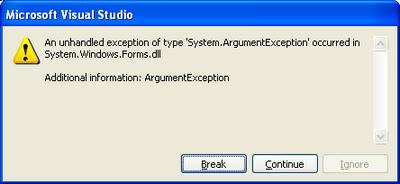
this.Controls.Add(new Label());
I get this cruel, indescript error:
Note that I get the error no matter what type of Control I try to add (e.g. TextBox, ListView, etc.). Unfortunately, this is the worst type of error because the Exception can't be easily searched via Google.
My hunch at the moment is that this Exception is indicative of something more wrong than an ArgumentException (particularly because I KNOW that the argument is correct). The method that contains this Control.Add function is called by an event triggered by a Timer thread, I suspect that this could be the root of the problem. I found a post in the .NET newsgroups stating that manipulating a Windows Form from another thread is highly hazardous.
Update July 8th, 2005 12:29AM: I found out more information about the underlying problem here. From Code Project,
.NET allows you to call System.Windows.Forms.Control functions only from the thread in which the control was created. To run them from another thread we need to use the Control.Invoke (synchronous call) or Control.BeginInvoke (asynchronous call) functions.
Aha, now we're on the right track. However, note that .NET Compact Framework 1.0 does not support Control.BeginInvoke (although .NET CF 2.0 does). That's fine though. I created my own delegate and tried this on my own -- something really simple like public delegate void MyDelegate(); But then what do you know, I get the exact same System.ArgumentException as before but now when I call MyForm.Invoke(MyDelegate). It took me forever to track down why because it's in very small print in the MSDN API for the Control.Invoke method (and I missed it quite a few times):
Platform Note: In .NET Compact Framework applications, the delegate must be an instance of EventHandler. For an example, see How to: Use a Custom Delegate.
So, you can't use your own delegate, it has to be an instance of EventHandler. I haven't actually tried this yet because it took me roughly two hours to figure this out. I originally found out about this delegrate constraint here:
7.10. Can I create a custom delegate to pass to invoke?
No, in the .NET Compact Framework, only EventHandler methods can be invoked. The proper method for doing this is described here:
public void HandleMe(object o, EventArgs e) {...}
form.Invoke(new EventHandler(form.HandleMe));
Although the following will compile, it will not work properly:
public delegate void MyHandler();
public void HandleMeBadly() {...}
form.Invoke(new MyHandler(form.HandleMeBadly));
In fact, the HandleMeBadly code above does compile, which makes it even more confusing. If you try to run that code, you will get an ArgumentException error. Given what I know now, however, that Exception actually makes sense, as opposed to when I called this.Controls.Add(new Label()) in the non-creation thread.
Naming Conventions
People at my work are used to the Java naming conventions; C# is fairly different. For example, the guideline states that the first letter of methods and package names should be capitalized. Go here for more.
Wednesday, July 06, 2005
Update: Tab Order
Previously, I posted about tab order problems with custom controls.
I found more information about it in the .NET Compact Framework Developer's Guide (here), which says,
To tab out of the custom control to the previous control, call this.Parent.Controls(this.Parent.GetChildIndex(customcontrol) - 1).Focus() in the KeyDown event handler when a Keys.Up key is detected.
I also found this exact phrasing in the Smart Client Developer Center Home: Frequently Asked Questions (link).
5.41. How do I tab out of a custom control to the previous control?
Call this.Parent.Controls(this.Parent.GetChildIndex(customcontrol) - 1).Focus() in the KeyDown event handler when a Keys.Up key is detected.
There are multiple glaring errors with this documentation, which I find completely unsatisfactory. The code they meant to write was something more along the lines of:
this.Parent.Controls[this.Parent.Controls.GetChildIndex(customcontrol) - 1].Focus() ;
1. this.Parent.Controls returns a ControlCollection which is accessed with brackets, not parenthesis
2. this.Parent.GetChildIndex does not exist, they meant to write this.Parent.Controls.GetChildIndex
Even given these two corrections, this code is still not entirely accurate. We really don't want to try and give focus to just any Control -- in fact, some controls can't be focused (e.g. panels, labels, etc.) so using their code, in some cases, we end up with nothing being focused at all. To fix this, we could change this code to something more like this:
int index = this.Parent.Controls.GetChildIndex(customcontrol);
do{
if(index == 0)
index = this.Parent.Controls.Count; //roll over
} while(!this.Parent.Controls[--index].CanFocus());
this.Parent.Controls[index].Focus();
However, CanFocus() is not supported by the .NET Compact Framework, so instead we have to do something like this:
int index = this.Parent.Controls.GetChildIndex(customcontrol);
do{
if(index == 0)
index = this.Parent.Controls.Count; //roll over
} while(!this.Parent.Controls[--index].Focus());
In the above code, we rely on the fact that the Control.Focus method returns false if the focus request was unsuccessful to find a Control that is focusable.
Update July 6th 2005, 2:00PM: Hmm, actually, as it turns out the Control.Focus() method returns true for Controls like Label -- which is somewhat contradictory to API documentation. So, I had to change this slightly. Here is some OnKeyDown code that I wrote for the SmartPhone that provides tab control for custom controls (sorry about the formatting, if I keep writing code on this blog, I will have to get a tool that simplifies posting code and formats it nicely as well).
protected override void OnKeyDown(KeyEventArgs e){
switch (e.KeyCode)
{
case Keys.Down:
int index = this.Parent.Controls.GetChildIndex(this);
do{
if ((index + 1) == this.Parent.Controls.Count)
index = -1; //roll over
index++;
} while (!isFocusable(this.Parent.Controls[index]));
break;
case Keys.Up:
index = this.Parent.Controls.GetChildIndex(this);
do{
if (index == 0)
index = this.Parent.Controls.Count; //roll over
index--;
} while(!isFocusable(this.Parent.Controls[index]));
break;
}
base.OnKeyDown(e);
}
public bool isFocusable(Control control)
{
if(control is Label)
return false;
else
return true;
}
I found more information about it in the .NET Compact Framework Developer's Guide (here), which says,
To tab out of the custom control to the previous control, call this.Parent.Controls(this.Parent.GetChildIndex(customcontrol) - 1).Focus() in the KeyDown event handler when a Keys.Up key is detected.
I also found this exact phrasing in the Smart Client Developer Center Home: Frequently Asked Questions (link).
5.41. How do I tab out of a custom control to the previous control?
Call this.Parent.Controls(this.Parent.GetChildIndex(customcontrol) - 1).Focus() in the KeyDown event handler when a Keys.Up key is detected.
There are multiple glaring errors with this documentation, which I find completely unsatisfactory. The code they meant to write was something more along the lines of:
this.Parent.Controls[this.Parent.Controls.GetChildIndex(customcontrol) - 1].Focus() ;
1. this.Parent.Controls returns a ControlCollection which is accessed with brackets, not parenthesis
2. this.Parent.GetChildIndex does not exist, they meant to write this.Parent.Controls.GetChildIndex
Even given these two corrections, this code is still not entirely accurate. We really don't want to try and give focus to just any Control -- in fact, some controls can't be focused (e.g. panels, labels, etc.) so using their code, in some cases, we end up with nothing being focused at all. To fix this, we could change this code to something more like this:
int index = this.Parent.Controls.GetChildIndex(customcontrol);
do{
if(index == 0)
index = this.Parent.Controls.Count; //roll over
} while(!this.Parent.Controls[--index].CanFocus());
this.Parent.Controls[index].Focus();
However, CanFocus() is not supported by the .NET Compact Framework, so instead we have to do something like this:
int index = this.Parent.Controls.GetChildIndex(customcontrol);
do{
if(index == 0)
index = this.Parent.Controls.Count; //roll over
} while(!this.Parent.Controls[--index].Focus());
In the above code, we rely on the fact that the Control.Focus method returns false if the focus request was unsuccessful to find a Control that is focusable.
Update July 6th 2005, 2:00PM: Hmm, actually, as it turns out the Control.Focus() method returns true for Controls like Label -- which is somewhat contradictory to API documentation. So, I had to change this slightly. Here is some OnKeyDown code that I wrote for the SmartPhone that provides tab control for custom controls (sorry about the formatting, if I keep writing code on this blog, I will have to get a tool that simplifies posting code and formats it nicely as well).
protected override void OnKeyDown(KeyEventArgs e){
switch (e.KeyCode)
{
case Keys.Down:
int index = this.Parent.Controls.GetChildIndex(this);
do{
if ((index + 1) == this.Parent.Controls.Count)
index = -1; //roll over
index++;
} while (!isFocusable(this.Parent.Controls[index]));
break;
case Keys.Up:
index = this.Parent.Controls.GetChildIndex(this);
do{
if (index == 0)
index = this.Parent.Controls.Count; //roll over
index--;
} while(!isFocusable(this.Parent.Controls[index]));
break;
}
base.OnKeyDown(e);
}
public bool isFocusable(Control control)
{
if(control is Label)
return false;
else
return true;
}
Tuesday, July 05, 2005
No Transformation (or any GDI+) Support
I wouldn't think so, but Google confirmed it by returning this article, .NET Compact Framework Graphics, by David Durant and Paul Yao (an excerpt from their book .NET Compact Framework Programming with C#).
This brings up another difference between the desktop .NET Framework and the .NET Compact Framework: available coordinate transformations. The desktop provides a rich set of coordinate transformations—scrolling, scaling, and rotating—through the Matrix class and the 3 × 3 geometric transform provided in the System.Drawing.Drawing2D namespace. The .NET Compact Framework, by contrast, supports no coordinate mapping. That means that, on handheld devices, application software that wants to scale, scroll, or rotate must handle the arithmetic itself because neither the .NET Compact Framework nor the underlying operating system provides any coordinate transformation helpers. What the .NET Compact Framework provides, as far as coordinates go, is actually the same thing that the underlying Windows CE system provides: pixels, more pixels, and only pixels.
This brings up another difference between the desktop .NET Framework and the .NET Compact Framework: available coordinate transformations. The desktop provides a rich set of coordinate transformations—scrolling, scaling, and rotating—through the Matrix class and the 3 × 3 geometric transform provided in the System.Drawing.Drawing2D namespace. The .NET Compact Framework, by contrast, supports no coordinate mapping. That means that, on handheld devices, application software that wants to scale, scroll, or rotate must handle the arithmetic itself because neither the .NET Compact Framework nor the underlying operating system provides any coordinate transformation helpers. What the .NET Compact Framework provides, as far as coordinates go, is actually the same thing that the underlying Windows CE system provides: pixels, more pixels, and only pixels.
SmartPhone Screen Resolution
Pocket PC:
- Portrait / Landscape QVGA (240x320, 96 dpi)
- Portrait / Landscape VGA (480x640, 192 dpi)
- Square screen (240x240, 96 dpi)
- Square screen VGA (480x480, 192 dpi)
Smartphone:
- Portrait (176x220, 96 dpi) <-SMT5600
- Portrait QVGA (240x320, 131 dpi)
The Audiovox SMT5600 features a TFT (Thin Film Transistor) screen, capable of displaying 65K colors. Measuring 2.2-inch-diagonally, it has a resolution of 176 x 220 px.
(from MSDN)Monday, July 04, 2005
Reading in Files on SmartPhone Emulator
The other day I made a post on http://forums.microsoft.com about trying to load input files on the SmartPhone SE Emulator, which you can find here. The problem, of course, is trying to figure out how the SmartPhone Emulator maps a portion of the desktop file system to its file system. The response I got was,
The easiest way is to use folder sharing. Under File\Configure\General Tab set the folder sharing directory to any directory on your desktop. Put your text files into that directory and they will be accessible from "\Storage Card\" inside the Windows Mobile OS.
Though these instructions were either for VS2003 or inaccurate -- I got the point. In VS2005 you can do something similar by going to the File Menu -> Tools -> Options -> Device Tools -> Devices -> Smartphone 2003 SE Emulator -> Properties -> Emulator Options. The Emulator Options button opens a Emulator Properties dialog box. In the General tab of this dialog, you can input a "Shared folder" path, which I did (Incidentally, if you hit F1 on this tab for Help, you will note that the only function not explained in the Help is the "Shared folder"! Hmm, maybe it's supposed to be self-explanatory).
However, we're not done yet. We still have to figure out a way to refer to this "Shared folder" in your code -- This is something I have yet to figure out. I tried one thing this morning, which was to create a file programtically on the SmartPhone Emulator and see if I could find it on the desktop. I ran this simple test code:
string FILE_NAME = "MyFile.txt";
if (File.Exists(FILE_NAME))
{
Console.WriteLine("{0} already exists.", FILE_NAME);
}
StreamWriter sw = File.CreateText(FILE_NAME);
sw.WriteLine("This is my file.");
sw.Close();
After the code completed, I could not find the file anywhere on my desktop's filesystem. I also tried "\\Storage\\MyFile.txt" and "\\Storage Card\\MyFile.txt" for FILE_NAME but no dice. If you create FileInfo or DirectoryInfo objects to look at the file, it appears to be using the SmartPhone-type filesystem (e.g. root dir is \ instead of, say, c:\).
Update (July 5th 2005, 3:35PM): As Vladimir's comment suggests, he followed up on his original reply to me on the message boards here. A copy of the post follows:
The directions were for VS2005 DE for configuration of the running instance of the emulator. There are three emulator configurations that exist - global, local saved and instance. The Global configuration is what you set under Tools\Options\Device Tools\Pick Platform\Properties\Emulator Options. The global configuration will be applied to an emulator if there is no local saved state. If you have created a local saved state - the global configuration is ignored until you clear the saved state. The instance configuration is accessed after the emulator is started via File\Configure (on the emulator itself) and is only applied to the instance that is running.
So if you start the emulator and click on the emulator File menu, select Configure option and then select General Tab - you should see the "Shared Folder" textbox.
The folder is accessed as "\Storage Card\". My guess is that you changed your global configuration but it was not applied because you had a local saved state. You can verify that the shared folder works correctly by craddling your emulator with Device Emulator Manager and using ActiveSync to browse the filesystem.
I tried this and it works perfectly.
The easiest way is to use folder sharing. Under File\Configure\General Tab set the folder sharing directory to any directory on your desktop. Put your text files into that directory and they will be accessible from "\Storage Card\" inside the Windows Mobile OS.
Though these instructions were either for VS2003 or inaccurate -- I got the point. In VS2005 you can do something similar by going to the File Menu -> Tools -> Options -> Device Tools -> Devices -> Smartphone 2003 SE Emulator -> Properties -> Emulator Options. The Emulator Options button opens a Emulator Properties dialog box. In the General tab of this dialog, you can input a "Shared folder" path, which I did (Incidentally, if you hit F1 on this tab for Help, you will note that the only function not explained in the Help is the "Shared folder"! Hmm, maybe it's supposed to be self-explanatory).
However, we're not done yet. We still have to figure out a way to refer to this "Shared folder" in your code -- This is something I have yet to figure out. I tried one thing this morning, which was to create a file programtically on the SmartPhone Emulator and see if I could find it on the desktop. I ran this simple test code:
string FILE_NAME = "MyFile.txt";
if (File.Exists(FILE_NAME))
{
Console.WriteLine("{0} already exists.", FILE_NAME);
}
StreamWriter sw = File.CreateText(FILE_NAME);
sw.WriteLine("This is my file.");
sw.Close();
After the code completed, I could not find the file anywhere on my desktop's filesystem. I also tried "\\Storage\\MyFile.txt" and "\\Storage Card\\MyFile.txt" for FILE_NAME but no dice. If you create FileInfo or DirectoryInfo objects to look at the file, it appears to be using the SmartPhone-type filesystem (e.g. root dir is \ instead of, say, c:\).
Update (July 5th 2005, 3:35PM): As Vladimir's comment suggests, he followed up on his original reply to me on the message boards here. A copy of the post follows:
The directions were for VS2005 DE for configuration of the running instance of the emulator. There are three emulator configurations that exist - global, local saved and instance. The Global configuration is what you set under Tools\Options\Device Tools\Pick Platform\Properties\Emulator Options. The global configuration will be applied to an emulator if there is no local saved state. If you have created a local saved state - the global configuration is ignored until you clear the saved state. The instance configuration is accessed after the emulator is started via File\Configure (on the emulator itself) and is only applied to the instance that is running.
So if you start the emulator and click on the emulator File menu, select Configure option and then select General Tab - you should see the "Shared Folder" textbox.
The folder is accessed as "\Storage Card\". My guess is that you changed your global configuration but it was not applied because you had a local saved state. You can verify that the shared folder works correctly by craddling your emulator with Device Emulator Manager and using ActiveSync to browse the filesystem.
I tried this and it works perfectly.
Sunday, July 03, 2005
By Pen You Mean Color
The Pen object in .NET CF 1.0 is incredibly limited. It has no methods and only one property, which is Color. So basically the Pen object is a glorified Color object. The .NET CF 2.0 fixes this a bit by including the Width attribute.
I found this in the MSDN .NET CF 1.0 FAQ:
I found this in the MSDN .NET CF 1.0 FAQ:
Setting the pen width is not available in the .NET Compact Framework. Some alternate solutions include:
- Drawing filled rectangles with the Graphics.FillRectangle method
- Drawing multiple lines next to each other
- Writing a custom graphics routine with GAPI
Let the Designers Choose
I can understand why Microsoft has endeavored to make clear the interaction/ui differences between a desktop and a SmartPhone or even a PocketPC and SmartPhone to developers. Obviously, the lack of a mouse or touchscreen introduces a new set of HCI issues. I will say, though, that I am fundamentally opposed to how Microsoft has chosen to ensure SmartPhone developers don't veer off a fairly rigid idea about how SmartPhone interaction should take place -- which is somewhat ironic given that the developers in my research group find the SmartPhone OS UI to be overly complicated. The focus seemed to be create an OS interface that follows the most prominent UI features/models of Windows rather than creating an OS interface that is actually good as a phone UI (e.g. syncing to the Outlook contact list probably seemed like a good idea until you test it with actual users, where you would find that, in fact, much of an Outlook contact list is not made up of phone numbers but rather e-mail addresses! This is great if I want to use e-mail on my phone but not when I just want to make a phone call. My Outlook contact list is populated with 100s of contacts whom I rarely talk to and would never call (because, for one, I don't even have their numbers). But I digress...
Back to my original topic which is: the way Microsoft has structured the .NET CF API to enforce its limited vision of HCI on the phones.
Case in point, radio buttons. Yes, radio buttons. Microsoft disallows Radio Buttons on the SmartPhones. They made that choice for me. They think radiobuttons are a bad idea on an interface that small with limited input mechanisms. Instead, they suggest I use a ListView where only one item can be selected at a time (ah, how clever, that's just like a radiobutton but not!). However, in my application, it is much more relevant and intuitive to usea radiobutton. But somehow this choice isn't mine, it's Microsofts.
You know, fundamentally, I think the .NET CF GUI API should really just expose everything. Let the designers choose what's right or wrong. I know Microsoft is trying to provide some baseline standard, fine, but don't restrict my creative freedom and design talents.
Back to my original topic which is: the way Microsoft has structured the .NET CF API to enforce its limited vision of HCI on the phones.
Case in point, radio buttons. Yes, radio buttons. Microsoft disallows Radio Buttons on the SmartPhones. They made that choice for me. They think radiobuttons are a bad idea on an interface that small with limited input mechanisms. Instead, they suggest I use a ListView where only one item can be selected at a time (ah, how clever, that's just like a radiobutton but not!). However, in my application, it is much more relevant and intuitive to usea radiobutton. But somehow this choice isn't mine, it's Microsofts.
You know, fundamentally, I think the .NET CF GUI API should really just expose everything. Let the designers choose what's right or wrong. I know Microsoft is trying to provide some baseline standard, fine, but don't restrict my creative freedom and design talents.
Saturday, July 02, 2005
How Dare You Take My OwnerDraw Away!
So, I thought the ListView class might be the answer to all of my Key Event problems. I need an interface on the phone with multiple controls that all respond to "hot key" presses. The ListView Control, which is probably the most used layout control on the phone, basically gives you this functionality if your two controls are "labels" and "checkboxes." In my case, I need one more control ala "radiobuttons" -- how hard could it be to draw a radiobutton instead of a checkbox in a custom ListView class?
So, I derived the ListView class and overrode the OnPaint and OnBackgroundPaint methods and launched a test on the emulator. Hmm, it looked like my OnPaint methods were not being called. WTF? Some searching found, "The ListView control is drawn by the operating system or is owner drawn, so the Paint event is never raised. For more information about owner-drawing, see the OwnerDraw property." Stop right there!
Yes things still sound salvagable until you note that the .NET CF 1.0 ListView control does NOT have an OwnerDraw property. Try it yourself if you like -- create a simple class MyListView : ListView and then override OnPaint and OnBackgroundPaint. Note how those methods are never called. So, unless you are using .NET 2.0 you're screwed.
Jon goes back to the drawing board now (which will probably involve something like the custom list view found here, which is really not even a custom list view but rather a completely new custom control). Oh the woes of programming UI on the SmartPhones. Which bears the question, why build a huge set of widgets and then restrict their usage so much that they become useless?
So, I derived the ListView class and overrode the OnPaint and OnBackgroundPaint methods and launched a test on the emulator. Hmm, it looked like my OnPaint methods were not being called. WTF? Some searching found, "The ListView control is drawn by the operating system or is owner drawn, so the Paint event is never raised. For more information about owner-drawing, see the OwnerDraw property." Stop right there!
Yes things still sound salvagable until you note that the .NET CF 1.0 ListView control does NOT have an OwnerDraw property. Try it yourself if you like -- create a simple class MyListView : ListView and then override OnPaint and OnBackgroundPaint. Note how those methods are never called. So, unless you are using .NET 2.0 you're screwed.
Jon goes back to the drawing board now (which will probably involve something like the custom list view found here, which is really not even a custom list view but rather a completely new custom control). Oh the woes of programming UI on the SmartPhones. Which bears the question, why build a huge set of widgets and then restrict their usage so much that they become useless?
Subscribe to:
Posts (Atom)
