Showing posts with label Exceptions. Show all posts

Sunday, July 06, 2008

SqlCeEngine.Upgrade() causes SqlCeException "The operation completed successfully."

I am building a simple desktop-based command-line analysis tool for a set of .SDF files that were collected on various mobile devices for a research project. Unfortunately, I am having issues connecting to these .SDF files from my tool (each of which are stored locally on my desktop hard drive). The problem seems to be that the version of SQL Compact Edition used on the mobile devices is different from the one I have installed on my desktop.

First, when connecting to one of the .SDF files from my desktop analysis tool, I receive the exception:

System.Data.SqlServerCe.SqlCeInvalidDatabaseFormatException was unhandled
Message="The database file has been created by an earlier version of SQL Server Compact. Please upgrade using SqlCeEngine.Upgrade() method."
Source="SQL Server Compact ADO.NET Data Provider"


I now catch this exception and call the recommended SqlCeEngine.Upgrade() method, so my code looks like this:

SqlCeConnection sqlConnection = GetConnection(pathToDatabase);

try
{
sqlConnection.Open();
}
catch (SqlCeInvalidDatabaseFormatException e)
{
Console.WriteLine("The database " + pathToDatabase + " appears to be an old version, running Upgrade()");
Stopwatch sw = Stopwatch.StartNew();
SqlCeEngine sqlCeEngine = new SqlCeEngine(GetConnectionString(pathToDatabase));
string newPathToDatabase = GetUpgradedDatabasePath(pathToDatabase);
string newConnectionString = GetUpgradedConnectionString(pathToDatabase, newPathToDatabase);
sqlCeEngine.Upgrade(newConnectionString);
sw.Stop();
Console.WriteLine("Upgraded the database in " + sw.ElapsedMilliseconds / 1000.0f + " secs");
sqlConnection = GetConnection(newPathToDatabase);
sqlConnection.Open();
}


The SqlCeEngine.Upgrade() call takes about one minute, afterwards it throws a very confusing exception:

System.Data.SqlServerCe.SqlCeException was unhandled
Message="The operation completed successfully."
Source="SQL Server Compact ADO.NET Data Provider"


Figure 1: One of the most confusing exception messages I've ever received.

At first I thought I should just catch this exception and carry on normally (as the exception says that the operation did indeed complete successfully); however, after some experimentation I noticed that the new, upgraded .SDF file built by the Upgrade() command is automatically deleted right before this exception is thrown so there is no upgraded .SDF file to connect to. Thus, it appears that the SqlCeException is valid but that the message is just wrong. I have attempted to use both the SqlCeEngine.Upgrade() call (which upgrades the database in place) and the SqlCeEngine.Upgrade(newConnectionString) call (which makes a new database). Both fail with the same exception.

Figure 2: Note how the upgraded database appears in the filesystem momentarily before being automatically deleted just before the Upgrade() method throws an exception.

Any help here would be most appreciated. Has anyone else encountered this error? Note, I also posted this to the SQL CE newsgroup here.

Update July 6th, 8:04PM: One workaround for this problem is to use the old v3.1 libraries in your desktop program. Thus, rather than use the .NET tab in the "Add Reference" dialog in Visual Studio, you would select "Browse" and then browse to the 3.1 libraries. For me, this is "C:\Program Files\Microsoft SQL Server Compact Edition\v3.1" Thankfully, Microsoft was smart enough to allow both sets of dlls on a machine (e.g., their 3.5 installation did not overwrite the 3.1 installation) as I also have a folder entitled "C:\Program Files\Microsoft SQL Server Compact Edition\v3.5" with the v3.5 libraries.

Thursday, July 07, 2005

Controls.Add ArgumentException

When executing this rather innocuous line of code within a System.Windows.Forms.Form:

this.Controls.Add(new Label());

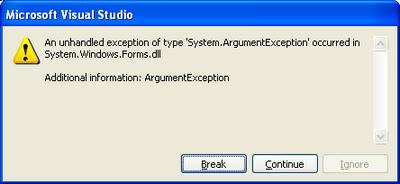
I get this cruel, indescript error:


Note that I get the error no matter what type of Control I try to add (e.g. TextBox, ListView, etc.). Unfortunately, this is the worst type of error because the Exception can't be easily searched via Google.

My hunch at the moment is that this Exception is indicative of something more wrong than an ArgumentException (particularly because I KNOW that the argument is correct). The method that contains this Control.Add function is called by an event triggered by a Timer thread, I suspect that this could be the root of the problem. I found a post in the .NET newsgroups stating that manipulating a Windows Form from another thread is highly hazardous.

Update July 8th, 2005 12:29AM: I found out more information about the underlying problem here. From Code Project,

.NET allows you to call System.Windows.Forms.Control functions only from the thread in which the control was created. To run them from another thread we need to use the Control.Invoke (synchronous call) or Control.BeginInvoke (asynchronous call) functions.

Aha, now we're on the right track. However, note that .NET Compact Framework 1.0 does not support Control.BeginInvoke (although .NET CF 2.0 does). That's fine though. I created my own delegate and tried this on my own -- something really simple like public delegate void MyDelegate(); But then what do you know, I get the exact same System.ArgumentException as before but now when I call MyForm.Invoke(MyDelegate). It took me forever to track down why because it's in very small print in the MSDN API for the Control.Invoke method (and I missed it quite a few times):

Platform Note: In .NET Compact Framework applications, the delegate must be an instance of EventHandler. For an example, see How to: Use a Custom Delegate.

So, you can't use your own delegate, it has to be an instance of EventHandler. I haven't actually tried this yet because it took me roughly two hours to figure this out. I originally found out about this delegrate constraint here:

7.10. Can I create a custom delegate to pass to invoke?

No, in the .NET Compact Framework, only EventHandler methods can be invoked. The proper method for doing this is described here:

public void HandleMe(object o, EventArgs e) {...}
form.Invoke(new EventHandler(form.HandleMe));

Although the following will compile, it will not work properly:

public delegate void MyHandler();
public void HandleMeBadly() {...}
form.Invoke(new MyHandler(form.HandleMeBadly));

In fact, the HandleMeBadly code above does compile, which makes it even more confusing. If you try to run that code, you will get an ArgumentException error. Given what I know now, however, that Exception actually makes sense, as opposed to when I called this.Controls.Add(new Label()) in the non-creation thread.