Ginny Caughey, a Device Application Development MVP, wrote about SQL Mobile size limitations in the microsoft.public.sqlserver.ce newsgroup (direct link here):
The limit for a SQL Mobile database is 4 gb, so unless my math is wrong, you shouldn't have any problems at all with 80,000 records of that size assuming you enough space on the device. I have a production app that handles 65,000 records and on a mobile device seeking to a unique key using the table's index is almost instantaneous. One thing I have found with big databases is that sometimes queries get very slow because the query processor apparently wants more memory for its own work than I have available. I've been able to reduce a 30-minute query to well under a second by switching from using SQL syntax to TableDirect in situations like that.
One other point with large amounts of data - don't try to load all that data into a DataSet. Use SqlCeResultSet and only load the data you need at any given point in your app.
Monday, July 31, 2006


VS2005 Debugging Problem, Breakpoints AutoDisabling Themselves
I posted today to microsoft.public.dotnet.languages.csharp about a VS2005 debugging problem that my colleague is experiencing (direct link).
My colleague is having problems debugging in VS2005. When he sets
breakpoints in his code and launches his application via Debug->Start
New Instance, the breakpoints autodisable themselves and the
"breakpoint icon" switches from being filled in to outlined with a
warning glyph on the bottom right hand corner. When moused-over, the
icon reads "The breakpoint will not currently be hit. The specified
module is not being loaded." I checked the loaded modules list via the
Debug->Windows->Modules interface and the specified module was, indeed
loaded, with a pointer to a valid pdb (as far as I can tell).
System.Diagnostics.Debugger.Breakpoint() works as does Debug->Step Into
new instance.
My colleague is having problems debugging in VS2005. When he sets
breakpoints in his code and launches his application via Debug->Start
New Instance, the breakpoints autodisable themselves and the
"breakpoint icon" switches from being filled in to outlined with a
warning glyph on the bottom right hand corner. When moused-over, the
icon reads "The breakpoint will not currently be hit. The specified
module is not being loaded." I checked the loaded modules list via the
Debug->Windows->Modules interface and the specified module was, indeed
loaded, with a pointer to a valid pdb (as far as I can tell).
I even started a brand new Form application from scratch and ran it in
debug mode without adding any new code. I set a breakpoint at the first
line in Program.cs but this too was autodisabled with the same "module
is not being loaded" warning.
I Googled around the newsgroups/web for a while but did not find
anything that directly related.
System.Diagnostics.Debugger.Breakpoint() works as does Debug->Step Into
new instance.
Thursday, July 27, 2006
Benchmarking StringBuilder vs. String
A recent CodeProject post compares StringBuilder vs. String across varying degrees of usage.
In the following article I will show you the numbers for StringBuilder vs String which I did measure with .NET 2.0 a P4 3.0 GHz and 1 GB RAM. Every test was performed 5 million times to get a stable value. (link)
I wonder if the same performance would be observed on Windows Mobile Devices.
In the following article I will show you the numbers for StringBuilder vs String which I did measure with .NET 2.0 a P4 3.0 GHz and 1 GB RAM. Every test was performed 5 million times to get a stable value. (link)
I wonder if the same performance would be observed on Windows Mobile Devices.
Wednesday, July 26, 2006
Saturday, July 15, 2006
TextBox OnPaint in .NET CF 2.0
SqlServer Mobile Edition, In-Proc Database
I just posted the following to microsoft.public.sqlserver.ce:
On Sriram Krishnan's blog he writes, "Sql Mobile is a super-lightweight, in-proc database that runs on devices. The key phrase for me personally is 'in-proc'. This means that there is no IPC involved and as a result, performance is blindingly fast."
This is really the only discussion I could find about in-proc databases via a quick Google search. Can anyone provide me with any more information on what an "in-proc database" is and how it differs from an "out-of-proc?" database. The implication of Sriram's post is that SqlMobile is efficient because it doesn't use interprocess communcation (assuming that's what IPC stands for). Do most databases use IPC?
(direct link)
(Update: 07/16/2006 1:37PM) I received the following response from Ginny Caughey, a Device Application Development MVP.
Some databases such as SQL Server run as services in their own process space, often on a different machine from the apps that consume those services. Others such as SQL Server Everywhere/SQL Mobile are DLLs that run in the same process space as the application that uses them. Not only does this imply that there is no process boundary to impact perforamance, but also when the hosting application ends, so does the database engine so there is no service running to serve as a potential security threat. There are advantages to client/server databases such as SQL Server, but for stand-alone and mobile apps, there are also advantages for an in-process database such as SQL Mobile/Everywhere.
(direct link)
On Sriram Krishnan's blog he writes, "Sql Mobile is a super-lightweight, in-proc database that runs on devices. The key phrase for me personally is 'in-proc'. This means that there is no IPC involved and as a result, performance is blindingly fast."
This is really the only discussion I could find about in-proc databases via a quick Google search. Can anyone provide me with any more information on what an "in-proc database" is and how it differs from an "out-of-proc?" database. The implication of Sriram's post is that SqlMobile is efficient because it doesn't use interprocess communcation (assuming that's what IPC stands for). Do most databases use IPC?
(direct link)
(Update: 07/16/2006 1:37PM) I received the following response from Ginny Caughey, a Device Application Development MVP.
Some databases such as SQL Server run as services in their own process space, often on a different machine from the apps that consume those services. Others such as SQL Server Everywhere/SQL Mobile are DLLs that run in the same process space as the application that uses them. Not only does this imply that there is no process boundary to impact perforamance, but also when the hosting application ends, so does the database engine so there is no service running to serve as a potential security threat. There are advantages to client/server databases such as SQL Server, but for stand-alone and mobile apps, there are also advantages for an in-process database such as SQL Mobile/Everywhere.
(direct link)
Thursday, July 06, 2006
Purchased OpenNetCF SDF 2.0
I finally went ahead and purchased the SDF 2.0 Extensions for Visual Studio 2005 from OpenNetCF.org. It's only fifty bucks and you get the source code, which, for me, is mostly useful for educational purposes. I'm always wondering if my coding style, design, etc. are up to par. You can also use the free version of the SDF 2.0, which isn't crippled but doesn't include the source here. I used it for quite a while before deciding that I should support the OpenNetCF team.
Oh and by the way, the installer for the purchased version of SDF 2.0 takes about 15 minutes on my 3Ghz HT 1.5GB RAM Pentium 4 machine to complete. I was almost going to e-mail support that their installation package was broken but then I discovered the h2reg process, which is started by the installer, was just taking forever. I believe this is because of some of the integrated VS2005 stuff they've done in SDF 2.0. Note that the free version installs rather quickly.
Oh and by the way, the installer for the purchased version of SDF 2.0 takes about 15 minutes on my 3Ghz HT 1.5GB RAM Pentium 4 machine to complete. I was almost going to e-mail support that their installation package was broken but then I discovered the h2reg process, which is started by the installer, was just taking forever. I believe this is because of some of the integrated VS2005 stuff they've done in SDF 2.0. Note that the free version installs rather quickly.
Tuesday, July 04, 2006
ActiveSync, A Lesson Learned
At the risk of jumping the gun here, it appears that my ActiveSync woes were not due to Microsoft's negligence or poor programming (though, I suppose, they really should have had the ActiveSync troubleshooter page much earlier, circa 4.0 or even 3.X). In fact, it was my own fault for not noticing that my IT department at work packaged BlackICE (a firewall program) with our VPN software. So, simply by installing our VPN (a rather innocuous gesture), I created a firewall that prevented TCP traffic over port 990.
Now, I'm not 100% confident that this will solve all of my ActiveSync issues but it appears that, at the moment, I've figured out the connection problem.
Now, I'm not 100% confident that this will solve all of my ActiveSync issues but it appears that, at the moment, I've figured out the connection problem.
Sunday, July 02, 2006
ActiveSync Connection Problems Continue
I finally decided to post to the ActiveSync newsgroup about my ActiveSync issues (here). Here's a copy of the post:
My laptop will not connect to any of my WM 5.0 devices (including the i-mate KJAM, the Cingular 2125, and the T-MOBILE SDA). Though I've experienced this problem in the past, I've been able to uinstall and reinstall ActiveSync 4.2 and restart my computer to solve the problem.
I've been blogging about my problematic encounters with ActiveSync for a while now but have never sought the expertise of this newsgroup. I'll provide a quick summary of my ActiveSync issues here. You can visit my blog for more details: http://csharponphone.blogspot.com/2006/05/activesync-41-sit-spin.html
Basically, I plug-in my WM 5.0 device, the little networking animation starts up in the taskbar (and says acquiring network address, etc.). This icon dissapears and then the ActiveSync icon in the taskbar turns green and starts to spin. This continues until a timeout is reached at which point I'm given a choice of visiting Microsoft's troubleshooter webpage (it then forwards me on to the "If ActiveSync Cannot Receive Data Through Port 990" page). I've tried following all of the previous advice posted here and on the web, but to no avail. My laptop is running Windows Firewall and McAfee VirusScan Enterprise 8.0.0.
Any help from MVPs, Microsoft employees, or anyone with a clue into what might be happening would be much appreciated.
NETSTAT RETURNS:
Active Connections
Proto Local Address Foreign Address State
TCP 127.0.0.1:1150 127.0.0.1:1151 ESTABLISHED
TCP 127.0.0.1:1151 127.0.0.1:1150 ESTABLISHED
TCP 192.168.2.76:1038 64.233.167.125:5222 ESTABLISHED
IP-CONFIG RETURNS:
Ethernet adapter Local Area Connection 16:
Connection-specific DNS Suffix . :
Description . . . . . . . . . . . : Windows Mobile-based Device #14
Physical Address. . . . . . . . . : 80-00-60-0F-E8-00
Dhcp Enabled. . . . . . . . . . . : Yes
Autoconfiguration Enabled . . . . : No
IP Address. . . . . . . . . . . . : 169.254.2.2
Subnet Mask . . . . . . . . . . . : 255.255.255.0
Default Gateway . . . . . . . . . :
DHCP Server . . . . . . . . . . . : 169.254.2.1
Lease Obtained. . . . . . . . . . : Sunday, July 02, 2006 1:53:41 PM
Lease Expires . . . . . . . . . . : Tuesday, August 01, 2006 1:53:41 PM
Update: 07/04/2006 11AM: Here's my follow-up to the post above:
I'm ashamed to admit this, but it never occurred to me to check my
process list to see if there was any networking software running on my
computers that I did not know about. Imagine my surprise when I saw
blackd.exe (part of the BlackICE firewall package). As soon as I
noticed this, I figured this might be the root of my problem. It seems
the company that I work for includes a custom install of the BlackICE
installation with their VPN software. I force closed the process in
Task Manager, plugged in my WM 5.0 device and, what do you know,
ActiveSync turns green immediately and says connected.
I probably would have thought of this earlier on, but ActiveSync would
occassionally work--it wasn't a consistent problem. This maybe more an
issue with BlackICE however.
Unfortunately, the install of BlackICE that I have does not include a
frontend, so I must manually edit their configuration file to open the
ActiveSync related ports (despite warnings in the file itself against
it).
So, in the end, it appears my frustration was misdirected at Microsoft.
It really should have been at my IT department for not disclosing that
BlackICE was packaged with our VPN.
Hopefully now my ActiveSync problems are solved.
My laptop will not connect to any of my WM 5.0 devices (including the i-mate KJAM, the Cingular 2125, and the T-MOBILE SDA). Though I've experienced this problem in the past, I've been able to uinstall and reinstall ActiveSync 4.2 and restart my computer to solve the problem.
I've been blogging about my problematic encounters with ActiveSync for a while now but have never sought the expertise of this newsgroup. I'll provide a quick summary of my ActiveSync issues here. You can visit my blog for more details: http://csharponphone.blogspot.com/2006/05/activesync-41-sit-spin.html
Basically, I plug-in my WM 5.0 device, the little networking animation starts up in the taskbar (and says acquiring network address, etc.). This icon dissapears and then the ActiveSync icon in the taskbar turns green and starts to spin. This continues until a timeout is reached at which point I'm given a choice of visiting Microsoft's troubleshooter webpage (it then forwards me on to the "If ActiveSync Cannot Receive Data Through Port 990" page). I've tried following all of the previous advice posted here and on the web, but to no avail. My laptop is running Windows Firewall and McAfee VirusScan Enterprise 8.0.0.
Any help from MVPs, Microsoft employees, or anyone with a clue into what might be happening would be much appreciated.
NETSTAT RETURNS:
Active Connections
Proto Local Address Foreign Address State
TCP 127.0.0.1:1150 127.0.0.1:1151 ESTABLISHED
TCP 127.0.0.1:1151 127.0.0.1:1150 ESTABLISHED
TCP 192.168.2.76:1038 64.233.167.125:5222 ESTABLISHED
IP-CONFIG RETURNS:
Ethernet adapter Local Area Connection 16:
Connection-specific DNS Suffix . :
Description . . . . . . . . . . . : Windows Mobile-based Device #14
Physical Address. . . . . . . . . : 80-00-60-0F-E8-00
Dhcp Enabled. . . . . . . . . . . : Yes
Autoconfiguration Enabled . . . . : No
IP Address. . . . . . . . . . . . : 169.254.2.2
Subnet Mask . . . . . . . . . . . : 255.255.255.0
Default Gateway . . . . . . . . . :
DHCP Server . . . . . . . . . . . : 169.254.2.1
Lease Obtained. . . . . . . . . . : Sunday, July 02, 2006 1:53:41 PM
Lease Expires . . . . . . . . . . : Tuesday, August 01, 2006 1:53:41 PM
Update: 07/04/2006 11AM: Here's my follow-up to the post above:
I'm ashamed to admit this, but it never occurred to me to check my
process list to see if there was any networking software running on my
computers that I did not know about. Imagine my surprise when I saw
blackd.exe (part of the BlackICE firewall package). As soon as I
noticed this, I figured this might be the root of my problem. It seems
the company that I work for includes a custom install of the BlackICE
installation with their VPN software. I force closed the process in
Task Manager, plugged in my WM 5.0 device and, what do you know,
ActiveSync turns green immediately and says connected.
I probably would have thought of this earlier on, but ActiveSync would
occassionally work--it wasn't a consistent problem. This maybe more an
issue with BlackICE however.
Unfortunately, the install of BlackICE that I have does not include a
frontend, so I must manually edit their configuration file to open the
ActiveSync related ports (despite warnings in the file itself against
it).
So, in the end, it appears my frustration was misdirected at Microsoft.
It really should have been at my IT department for not disclosing that
BlackICE was packaged with our VPN.
Hopefully now my ActiveSync problems are solved.
Two Inch View
Just added an RSS feed to a new blog called "The Two Inch View," which is dedicated to "Windows Mobile media and entertainment." The site design is crisp and very readable and the author has a long history with WindowsCE/Mobile (a former MVP). The site is actually sponsored by Windows Mobile, which hopefully implies a strong foundation and dedication to frequent updates. It currently has some posts on the Windows Mobile Device Center, which looks like a new skin on top of ActiveSync (and, hopefully, includes some bug fixes to ActiveSync as well).
Friday, June 30, 2006
Microsoft Bluetooth Stack
Peter Foot, who developed 32feet.net, has a list of Windows Mobile devices that use the Microsoft Bluetooth Stack (as opposed to, say, some 3rd party stack like the Widcomm stack whose SDK is cost prohibitive for most developers--and certainly most graduate students like myself).
Friday, June 23, 2006
.NET CF 2.0 SP1 Released
"Microsoft .NET Compact Framework version 2.0 SP1 release has been completed and is in the process of being released. This service pack was driven customer feedback including improvements in stability, adds new debugging features, extended platform support, and new developer functionality." (from .NET CF Team Blog)
Download it here.
Download it here.
Thursday, June 22, 2006
Sql Server 2005 Mobile
Astonishing as it now seems to me, I had not used SQL before integrating Sql Server 2005 mobile into my current project. That said, I occassionally run into these problems that could only happen to a SQL neophyte. For example, I've found out the hard way that naming your table columns either Trigger, Default or Option is a bad thing and confuses the hell out of SQL (and your development team members). Trigger, Default and Option, as I'm sure most of you know, are reserved words in Sql.
Tuesday, June 13, 2006
More ActiveSync Woes
I've had trouble with "cradling the emulator" in ActiveSync ever since I found out about this feature. In VS2005, open Tools->Device Emulator Manager. In the Emulator Manager, right click on a device and select "connect." Once the specified emulator has launched and loaded, you can right click on that device (again in the Emulator Manager) and select "cradle." This should cradle the emulator to ActiveSync so you can, for example, explore the emulator file system. However, this feature rarely works for me. Typically what happens is that after I select "cradle", the icon immediately changes (signifying that the device is indeed cradled) but ActiveSync does not respond. This seems independent of the "sit and spin" issue though as the ActiveSync icon does not change to green, nor does it animate at all. It simply stays gray.
Ah, ActiveSync, how you destroy my workday efficiency.
Update (07/12/2006 11:00AM): OK, thanks to Sriram's feedback (see Comments), I figured this out. Here are the steps (click on the images to see full size screenshots).
Step 1: Open Device Emulator Manager in VS2005 (Tools->Device Emulator Manager)
Step 2: Right click on your device of interest, start it.
Step 3: After the device has started, right click on the device again and select 'Cradle.' See Figure 1 below.
Step 4: The icon should change to represent that the device has been cradled. However, this does not necessarily mean that ActiveSync has actually connected to the device. See Figure 2 below.
Step 5: If ActiveSync has not actually connected to the device, yet the cradled icon is shown, open up ActiveSync, select File->Connection Settings. This will open up a Connection Settings Dialog. From there, click the Connect button. See Figure 3 below. This should find and connect your emulator device to ActiveSync.
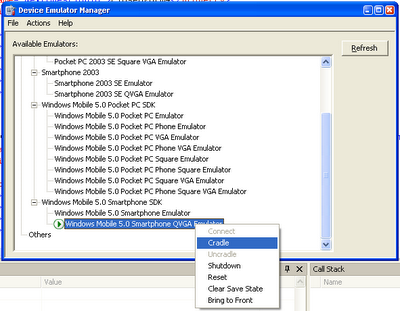 Figure 1: Cradle the emulator
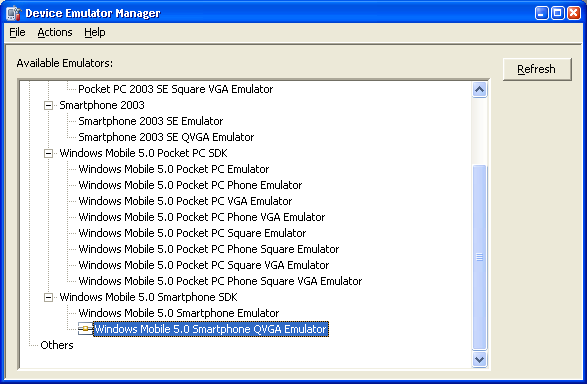 Figure 2: Emulator supposedly cradled
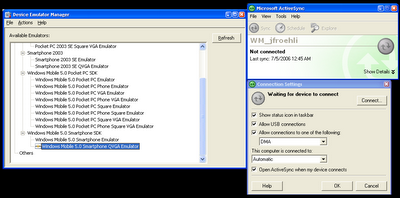 Figure 3: Open ActiveSync, click on File->Connection Settings. In the Connection Settings Dialog, click on the Connect... button. This should find your cradled emulator device.
Ah, ActiveSync, how you destroy my workday efficiency.
Update (07/12/2006 11:00AM): OK, thanks to Sriram's feedback (see Comments), I figured this out. Here are the steps (click on the images to see full size screenshots).
Step 1: Open Device Emulator Manager in VS2005 (Tools->Device Emulator Manager)
Step 2: Right click on your device of interest, start it.
Step 3: After the device has started, right click on the device again and select 'Cradle.' See Figure 1 below.
Step 4: The icon should change to represent that the device has been cradled. However, this does not necessarily mean that ActiveSync has actually connected to the device. See Figure 2 below.
Step 5: If ActiveSync has not actually connected to the device, yet the cradled icon is shown, open up ActiveSync, select File->Connection Settings. This will open up a Connection Settings Dialog. From there, click the Connect button. See Figure 3 below. This should find and connect your emulator device to ActiveSync.
 Figure 1: Cradle the emulator
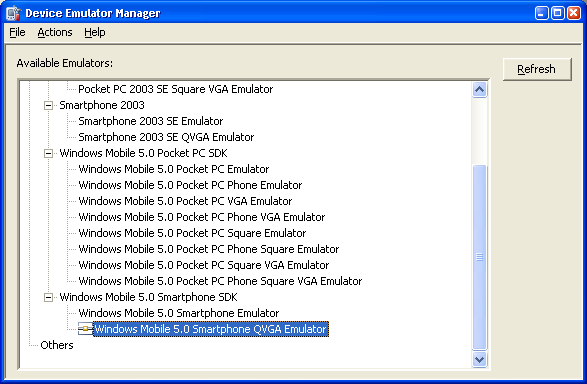 Figure 2: Emulator supposedly cradled
 Figure 3: Open ActiveSync, click on File->Connection Settings. In the Connection Settings Dialog, click on the Connect... button. This should find your cradled emulator device.
Tuesday, June 06, 2006
Installation Error, Support Info: 4
I had problems deploying and running .NET CF 2.0 applications on my i-mate K-JAM (running Windows Mobile 5.0--OS 5.1.70). I posted this message to Google Groups:
I've been unable to successfully load a small test app I've written in VS2005 and .NET CF 2.0 (C#) for the i-mate K-Jam PocketPC Phone Edition.
Mark Prentice replied with a pointer to a working solution at his blog:
I’m happy to report the workaround for the system failure, which will be included in SP1, has now also been slipstreamed into the current download. If .NET Compact Framework v2 CAB installation on a Windows Mobile 5.0 device fails with error #4 then this fix is for you. Just re-download the NETCFv2 package and re-install!
Here's a link to the .NET CF 2.0 download.
I've been unable to successfully load a small test app I've written in VS2005 and .NET CF 2.0 (C#) for the i-mate K-Jam PocketPC Phone Edition.
The error that pops up on the K-JAM when deploying and debugging from VS2005, "Installation error. Stop all applications and processes and maximize available storage space, and run installation again. Support info: 4."
If I attempt to run the app by clicking on it in the file explorer on the K-JAM, I get the error, "This application (TestPocket.exe) requires a newer version of the Microsoft .NET Compact Framework than the version installed on this device." When I click details, I get:
TestPocket.exe
InvalidProgramException
I've tried this with the target device selected as both "Windows Mobile 5.0 Pocket PC Device" and "Windows Mobile 5.0 SmartPhone Device." I receive the same error in both cases.
Mark Prentice replied with a pointer to a working solution at his blog:
I’m happy to report the workaround for the system failure, which will be included in SP1, has now also been slipstreamed into the current download. If .NET Compact Framework v2 CAB installation on a Windows Mobile 5.0 device fails with error #4 then this fix is for you. Just re-download the NETCFv2 package and re-install!
Here's a link to the .NET CF 2.0 download.
Sunday, June 04, 2006
.NET CF Menu Item Size
I'm developing an application that will be used by those with impaired vision and reduced motor control. Unfortunately, .NET CF makes it quite difficult to change font sizes for menus and menu items. In fact, MenuItem classes do not expose the Font property. In many instances, I avoid this problem because I run my application full screen--however, some messageboxes are run in "normal mode" with the menubars exposed.
Daniel Moth talks about a work around which involves modifying registry settings:
Menus (MainMenu, ContextMenu and MenuItem) are resized according to their Font. However, they do not expose a Font property, so you are stuck with whatever the default Font is for the platform. You can change that through the registry:
DWORD "Ht" for height , DWORD "Wt" for boldness: 700 or 400
same as above, but this applies to menu items rather than the menu bar
Daniel Moth talks about a work around which involves modifying registry settings:
Menus (MainMenu, ContextMenu and MenuItem) are resized according to their Font. However, they do not expose a Font property, so you are stuck with whatever the default Font is for the platform. You can change that through the registry:
HKLM\Menu\BarFntDWORD "Ht" for height , DWORD "Wt" for boldness: 700 or 400
HKLM\Menu\PopFntsame as above, but this applies to menu items rather than the menu bar
Friday, June 02, 2006
Params Keyword
The params keyword lets you specify a method parameter that takes an argument where the number of arguments is variable.
For example,
{
TestArgsMethod("Hello", " goodbye ", " hello");
TestArgsMethod("Numbers", 1, 2, 3, 4);
}
static void TestArgsMethod(String text, params Object[] args)
{
StringBuilder sb = new StringBuilder();
sb.Append(text);
foreach(Object o in args)
{
sb.Append(o.ToString());
}
Debug.WriteLine(sb.ToString());
}
Thursday, June 01, 2006
XmlReader and LineNumber
I made this post to microsoft.public.dotnet.languages.csharp but no one has responded, so I thought I'd repost it here. If you know the answer, please either leave a comment or respond in the newsgroup.
"According to the MSDN documentation within the XmlTextReader class for
.NET 2.0, the recommended practice to create XmlReader instances is
using the XmlReaderSettings class and the XmlReader.Create() method.
However, the problem is, the XmlReader class does not expose certain
properties that I need, e.g., LineNumber, LinePosition, etc. I would
like to follow Microsoft's recommended practices, but I'm not sure how
I can get XmlTextReader functionality out of XmlReader.
Update 07/12/2006 @ 1:03PM: Zafar Abbas responded with a solution,
The reader obtained via XmlReader.Create supports the IXmlLinfInfo interface
from which you can access the line properties:
"According to the MSDN documentation within the XmlTextReader class for
.NET 2.0, the recommended practice to create XmlReader instances is
using the XmlReaderSettings class and the XmlReader.Create() method.
However, the problem is, the XmlReader class does not expose certain
properties that I need, e.g., LineNumber, LinePosition, etc. I would
like to follow Microsoft's recommended practices, but I'm not sure how
I can get XmlTextReader functionality out of XmlReader.
Should I instantiate a XmlTextReader object and pass this to the
XmlReader.Create() method and then access this underlying text reader
to obtain the info I need? Or is there some way to get the
XmlReader.Create() method to return a XmlTextReader object? Or should I
ignore there suggestion and simply create an XmlTextReader object
manually and not use the XmlReader.Create() method at all.
Update 07/12/2006 @ 1:03PM: Zafar Abbas responded with a solution,
The reader obtained via XmlReader.Create supports the IXmlLinfInfo interface
from which you can access the line properties:
reader = XmlReader.Create (...)
IXmlLineInfo info = reader as IXmlLineInfo;
Console.WriteLine(info.LineNumber);
Console.WriteLine(info.LinePosition);
Monday, May 29, 2006
Windows CE != Windows Mobile
Wednesday, May 24, 2006
Alpha Blending
Since my last post was on drawing transparency color keys in .NET CF, I thought I should explore alpha blending as well. It is possible to do alpha blending .NET CF, but not without some effort (i.e., venturing into p/invoke). Here, at the .NET CF UI and More blog, the author writes:
Briefly, there are two ways to do alpha blending in WM5: the AlphaBlend() function and with the Image COM object in the Imaging API.
He then goes on to explain how to implement these two methods. (direct link). The happy alternative is offered through OpenNetCF (who else) in their SDF 2.0 library. See Alex Feinman's post here.
Subscribe to:
Posts (Atom)


