I posted the following to the .NET CF newsgroup this morning:
The Microsoft.WindowsMobile.Status.SystemState class offers a great way to track a number of interesting and useful device system states (e.g., incoming phone calls, battery strength, etc.). However, recently I observed that the SystemState.Changed += new ChangeEventHandler(OnSystemStateChanged) subscription must be made from the UI thread. Has anyone else run into this? I attempted to write a console app that uses many of these system state notifications; however, none of the events were actually occurring. Once I switched to a form-based application, everything worked great.
Is this documented somewhere? If so, I couldn't find it. I am programming in .NET CF 2 for Windows Mobile 5.0 devices.
Chris Tacke responded with,
Most of those events come from windows messages being posted at a low level (FileSystemWatcher works int he same way too). If you never call Application.Run, no message pump is ever created, so no windows messages are ever dispatched.
I don't think I've ever seen it documented, but if you walk through the aygshell source code in Platform Builder (which a lot of these come from eventually), you'll see that's how they work. I agree that it's a poor choice, but it's how it was implemented. The workaround is a very long, tedious process (again, we've done it for file system notifications) of reimplementing the entire listening system, creating a hidden window for your app or implementing a Run() that doesn't take a Form (like we did in the SDF).
Showing posts with label UI. Show all posts
Showing posts with label UI. Show all posts
Friday, October 26, 2007


Friday, July 20, 2007
Wallpaper, Screenshots, and Application Switching
To get around some of the Today Screen API limitations (see this post for a Today Screen rant), I've played around quite a bit with programatically switching the wallpaper on a WM device. However, there a number of problems with this approach, most significantly: changing the device wallpaper is slow and once the device has been signaled that the wallpaper has been updated, it does not actually redraw the wallpaper until the desktop is visible (e.g., the desktop is the top level window). For more about this issue, see my .NET CF newsgroup post. Nonetheless, changing the device wallpaper is one of the easiest ways to display ambient information.
A project at Intel Research required that a screenshot be taken of a specified application, cropped, and displayed as the wallpaper on the device. However, as mentioned above, setting the wallpaper on a user's device can be an intrusive operation--not only can it take between 10-30 seconds but the wallpaper update does not actually happen until all applications are minimized making the desktop visible.
I created a little test application which fulfills our requirements and attempts to avoid disrupting the user by waiting to execute until the device is idle. Here's how it works:
Download the source code and the binary. You should be able to compile and deploy as long as you have the Smart Device Framework 2.0 from the OpenNETCF team installed. This sample will probably work with the SDF 2.1 as well but I haven't tested it. Alternatively, you can download the binary zip file and add those .dll references to the source code project. I've also added this sample code to the samples directory in Roam (see SourceForge). Roam is a Windows Mobile open source library which provides functionality like a SQL connection pool, power management functions, and a whole slew of UI code.
Note: this code has been tested on the Cingular 2125 and the T-Mobile SDA device. In addition, I also ran it on the Cingular 8125 Pocket PC Phone and everything worked except for the wallpaper changing code--this is because Roam's wallpaper changer methods only work on the SmartPhone.
A project at Intel Research required that a screenshot be taken of a specified application, cropped, and displayed as the wallpaper on the device. However, as mentioned above, setting the wallpaper on a user's device can be an intrusive operation--not only can it take between 10-30 seconds but the wallpaper update does not actually happen until all applications are minimized making the desktop visible.
I created a little test application which fulfills our requirements and attempts to avoid disrupting the user by waiting to execute until the device is idle. Here's how it works:
- Waits for device idle
- Finds handle to specified application (based on its window title)
- Switches from current app to specified application (saving current foreground window handle)
- Takes screenshot
- Crops screenshot (if necessary)
- Sets background wallpaper to screenshot
- Minimizes all open applications so phone background refreshes
- After background refresh, restores state of open applications
- Returns to saved foreground window handle
- Puts device back to sleep
Download the source code and the binary. You should be able to compile and deploy as long as you have the Smart Device Framework 2.0 from the OpenNETCF team installed. This sample will probably work with the SDF 2.1 as well but I haven't tested it. Alternatively, you can download the binary zip file and add those .dll references to the source code project. I've also added this sample code to the samples directory in Roam (see SourceForge). Roam is a Windows Mobile open source library which provides functionality like a SQL connection pool, power management functions, and a whole slew of UI code.
Note: this code has been tested on the Cingular 2125 and the T-Mobile SDA device. In addition, I also ran it on the Cingular 8125 Pocket PC Phone and everything worked except for the wallpaper changing code--this is because Roam's wallpaper changer methods only work on the SmartPhone.
Friday, April 13, 2007
Announcing Roam
Roam is a .NET CF 2 open source library for Windows Mobile devices that I've been developing off and on for the past year or so. A majority of the development has been driven off my own needs as a SmartPhone developer and HCI researcher. Although the source code is hosted on SourceForge and released under the BSD license (link), I have not had a chance to write a webpage or formal documentation. Thus, I've held off on advertising it on newsgroups/forums. I thought I would mention it here because I believe the source code could be of some use to my readers. Note that Roam requires OpenNETCF's Smart Device Framework (SDF 2.0) library. They just recently released SDF 2.1, I'm not sure if Roam is compatible or not...
Currently, the Roam library is broken down into four namespaces: Roam, Roam.Common, Roam.SqlCe, and Roam.UI. Each of these namespaces are compiled into their own assembly to save space.
Currently, the Roam library is broken down into four namespaces: Roam, Roam.Common, Roam.SqlCe, and Roam.UI. Each of these namespaces are compiled into their own assembly to save space.
- Roam: contains media related functionality (e.g., sound player, camera media sniffer), pocket outlook related code (e.g., semi-robust SMS sending system), and low level device related utility classes (e.g., power notifications, storage card utilities, device id)
- Roam.Common: contains code that is not-specific to Windows Mobile (i.e., this .dll also runs on the desktop). The largest subnamespace in this library is the Collections classes which include a HashSet, a Tree, a PriorityQueue, and a ReadOnlyHashtable among other things.
- Roam.SqlCe: contains code relevant to SQL Server Mobile / Compact Edition. Currently, only two classes exist: SqlCeConnectionManager which offers thread safe connection pooling using a singleton paradigm and SqlCeWrapper which also offers thread safe access to the database by wrapping the SqlCeConnection object.
- Roam.UI: this is the largest assembly in the Roam project. It contains many of the UI controls I've needed over the past year and were not included in .NET CF (e.g., scrollable label) I've developed a fairly simple drawing architecture that many of my custom UI classes use. Currently, Roam.UI contains custom controls for image buttons, radio list boxes, check box lists, key filtered lists, numeric text boxes and scrollable labels. In addition, Roam.UI features a set of utility classes that wrap P/Invoke calls to draw rounded rectangles, change the device's wallpaper, etc.
Thursday, January 11, 2007
Get Control From Handle
I have not yet determined a clean way to invoke code on the UI thread without access to a Form/Control. The Process class has a property called "MainWindowHandle," which returns the window handle of the main window of the associated process. So, for example, Process.GetCurrentProcess().MainWindowHandle would return a Handle (HWND) to the main window. But how can we translate a window handle to a Form?
In .NET 2.0, this is relatively easy, we can simply call Control.FromHandle(IntPtr handle). Thus, receiving access to the main window is simply:
(Form)Control.FromHandle(Process.GetCurrentProcess().MainWindowHandle)
Unfortunately, however, .NET CF 2.0 does not expose the Control.FromHandle method. I have not found anyone on the web who has solved this problem. A few relevant links:
1. How do I get System.Control object from a Win32 Handle?
2. Google Groups.
Given the limitations of CF, one hacky way to do this would be to expose a static property on your MainForm class which would return a reference to itself. This would actually work in my case as the MainForm should not be instantiated more than once.
Update 01/30/2007: I just made a post to Google Groups about this (link).
In .NET 2.0, this is relatively easy, we can simply call Control.FromHandle(IntPtr handle). Thus, receiving access to the main window is simply:
(Form)Control.FromHandle(Process.GetCurrentProcess().MainWindowHandle)
Unfortunately, however, .NET CF 2.0 does not expose the Control.FromHandle method. I have not found anyone on the web who has solved this problem. A few relevant links:
1. How do I get System.Control object from a Win32 Handle?
2. Google Groups.
Given the limitations of CF, one hacky way to do this would be to expose a static property on your MainForm class which would return a reference to itself. This would actually work in my case as the MainForm should not be instantiated more than once.
Update 01/30/2007: I just made a post to Google Groups about this (link).
Sunday, August 14, 2005
Cool Designer Trick for Panels
As far as I know, the VS2005 "Designer Tool" cannot be used with the System.Windows.Forms.Panel class. This can be utterly frustrating when doing layout. So, what I do instead is, first, rename my System.Windows.Forms.Panel derived class to extend System.Windows.Forms.Form. Now I can do my layout with the handy visual "Designer Tool" -- e.g. I right click on the source code and select "View Designer." Once I'm done adding widgets/controls and laying them out, I rename the .Form back to .Panel. Tada!
Wednesday, August 03, 2005
Curiosities of Control.Invoke...
I wrote about Control.Invoke(Delegate) once before with regards to the .NET CF restriction that the delegate must be an instance of the EventHandler. See the original post.
I was always curious though about Control.Invoke and whether or not it would act in a comparable manner to firing an event in the normal way (e.g. myEvent(this, EventArgs.Empty)). Is Control.Invoke essentially the same thing? The only obvious difference being that the event execution is transferred to the thread that owns the control's underlying window handle.
I finally got around to writing a little test util to verify its behavior. My strange conceptual suspicions/thoughts about what it might do were laid to rest and the reality has taken its place. Control.Invoke on an event delegate with multiple subscribers will iterate through each subscriber and fire the event (just as if you fired the event yourself -- in the non-Invoke manner).
I was always curious though about Control.Invoke and whether or not it would act in a comparable manner to firing an event in the normal way (e.g. myEvent(this, EventArgs.Empty)). Is Control.Invoke essentially the same thing? The only obvious difference being that the event execution is transferred to the thread that owns the control's underlying window handle.
I finally got around to writing a little test util to verify its behavior. My strange conceptual suspicions/thoughts about what it might do were laid to rest and the reality has taken its place. Control.Invoke on an event delegate with multiple subscribers will iterate through each subscriber and fire the event (just as if you fired the event yourself -- in the non-Invoke manner).
Friday, July 22, 2005
Control.Invoke System.ArgumentException
Even though I'd read this before, I'd forgotten about it and it caused me a slight headache today. If you call Control.Invoke on a custom event delegate which is not EventHandler, you will receive a System.ArgumentException.
From msdn,
Platform Note: In .NET Compact Framework applications, the delegate must be an instance of EventHandler. For an example, see How to: Use a Custom Delegate.
From msdn,
Platform Note: In .NET Compact Framework applications, the delegate must be an instance of EventHandler. For an example, see How to: Use a Custom Delegate.
Creating a multi-form app on SmartPhone
Creating a Multiple Form Application Framework for the Microsoft .NET Compact Framework by Chris Tacke on msdn.
Friday, July 15, 2005
MenuItem.MenuItems.Clear NotSupportedException
When I call myMenuItem.MenuItems.Clear() during runtime, I get a
"An unhandled exception of type 'System.NotSupportedException' occurred in System.Windows.Forms.dll
Additional information: NotSupportedException"
This same error occurs if I call myMenuItem.MenuItems.Remove(menu_i) in a for loop at the point when myMenuItem.MenuItems.Count is down to 1. I can remove all menu items up until that point successfully.
I posted to forums.microsoft.com here.
"An unhandled exception of type 'System.NotSupportedException' occurred in System.Windows.Forms.dll
Additional information: NotSupportedException"
This same error occurs if I call myMenuItem.MenuItems.Remove(menu_i) in a for loop at the point when myMenuItem.MenuItems.Count is down to 1. I can remove all menu items up until that point successfully.
I posted to forums.microsoft.com here.
Friday, July 08, 2005
Numeric Textbox
No easy way to make a "numbers" only TextBox with .NET CF on the SmartPhones. There are two easy ways of adding this, one simply traps keypresses on a custom TextBox and the other uses Platform Invoke.
(1) from http://forums.microsoft.com/msdn/ShowPost.aspx?PostID=47854
// in InitializeComponents, add this event handler.
this.textBox1.KeyPress += new System.Windows.Forms.KeyPressEventHandler(this.NumbericTextValidator);
// now this is the event handler's method.
private void NumbericTextValidator(
object sender,
System.Windows.Forms.KeyPressEventArgs e)
{
if ("0123456789".IndexOf(e.KeyChar) > -1)
e.Handled = false;
else
e.Handled = true;
}
(2) http://www.devx.com/wireless/Article/21291/1763
This solution uses Platform Invoke, which has the advantage of actually changing the text input mode icon in the upper right hand corner of the SMT5600 (e.g. T9, abc, 123, etc.).
(3) Something similar over at opennetcf.org.
Update (April 24th, 2006): In .NET CF 2.0 this is easy.
For CF 2.0 (Windows Mobile 5.0 Smartphone):
using Microsoft.WindowsCE.Forms; //at the top
InputModeEditor.SetInputMode(textBox1, InputMode.Numeric); //somewhere in your code
(from link)
(1) from http://forums.microsoft.com/msdn/ShowPost.aspx?PostID=47854
// in InitializeComponents, add this event handler.
this.textBox1.KeyPress += new System.Windows.Forms.KeyPressEventHandler(this.NumbericTextValidator);
// now this is the event handler's method.
private void NumbericTextValidator(
object sender,
System.Windows.Forms.KeyPressEventArgs e)
{
if ("0123456789".IndexOf(e.KeyChar) > -1)
e.Handled = false;
else
e.Handled = true;
}
(2) http://www.devx.com/wireless/Article/21291/1763
This solution uses Platform Invoke, which has the advantage of actually changing the text input mode icon in the upper right hand corner of the SMT5600 (e.g. T9, abc, 123, etc.).
(3) Something similar over at opennetcf.org.
Update (April 24th, 2006): In .NET CF 2.0 this is easy.
For CF 2.0 (Windows Mobile 5.0 Smartphone):
using Microsoft.WindowsCE.Forms; //at the top
InputModeEditor.SetInputMode(textBox1, InputMode.Numeric); //somewhere in your code
(from link)
Force Form to Top Level Focus
My .NET Compact Framework application requires that, from time to time, the user gets audibly alerted and a messagebox or form is displayed (using the System.Threading.Timer). Unfortunately, I have been unable to get my Form to display over the home screen. I have tried:
this.Focus();
this.Visible = true;
this.Show();
All in various combinations. I've found a few solutions about this on the web (I haven't tried either yet).
(1)
[DllImport("coredll.dll")]
public static extern bool SetForegroundWindow(IntPtr hWnd );
[DllImport("coredll")]
public static extern IntPtr FindWindow(string className, string wndName);
this.Show();
IntPtr hwnd = FindWindow(null, this.Text);
SetForegroundWindow(hwnd );
A full example can be found here.
(2)
If you need to fix your form at the top of the z-order, then rather than continually pulling the window to the front, use SetWindowPos (you'll need to P/Invoke) with the HWND_TOPMOST flag. This will keep your form at the top even if it loses focus. See the code for OpenNETCF.Win32.Win32Window for P/Invoke declaration:-http://vault.netcf.tv/VaultService/VaultWeb/GetFile.aspx?repid=2&path=%24%2fSDF%2fOpenNETCF.Windows.Forms%2fWin32%2fWin32Window.cs&version=2(username guest, password guest)
this.Focus();
this.Visible = true;
this.Show();
All in various combinations. I've found a few solutions about this on the web (I haven't tried either yet).
(1)
[DllImport("coredll.dll")]
public static extern bool SetForegroundWindow(IntPtr hWnd );
[DllImport("coredll")]
public static extern IntPtr FindWindow(string className, string wndName);
this.Show();
IntPtr hwnd = FindWindow(null, this.Text);
SetForegroundWindow(hwnd );
A full example can be found here.
(2)
If you need to fix your form at the top of the z-order, then rather than continually pulling the window to the front, use SetWindowPos (you'll need to P/Invoke) with the HWND_TOPMOST flag. This will keep your form at the top even if it loses focus. See the code for OpenNETCF.Win32.Win32Window for P/Invoke declaration:-http://vault.netcf.tv/VaultService/VaultWeb/GetFile.aspx?repid=2&path=%24%2fSDF%2fOpenNETCF.Windows.Forms%2fWin32%2fWin32Window.cs&version=2(username guest, password guest)
Thursday, July 07, 2005
Controls.Add ArgumentException
When executing this rather innocuous line of code within a System.Windows.Forms.Form:
this.Controls.Add(new Label());
I get this cruel, indescript error:
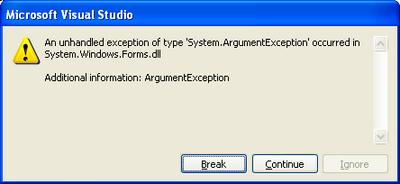
this.Controls.Add(new Label());
I get this cruel, indescript error:
Note that I get the error no matter what type of Control I try to add (e.g. TextBox, ListView, etc.). Unfortunately, this is the worst type of error because the Exception can't be easily searched via Google.
My hunch at the moment is that this Exception is indicative of something more wrong than an ArgumentException (particularly because I KNOW that the argument is correct). The method that contains this Control.Add function is called by an event triggered by a Timer thread, I suspect that this could be the root of the problem. I found a post in the .NET newsgroups stating that manipulating a Windows Form from another thread is highly hazardous.
Update July 8th, 2005 12:29AM: I found out more information about the underlying problem here. From Code Project,
.NET allows you to call System.Windows.Forms.Control functions only from the thread in which the control was created. To run them from another thread we need to use the Control.Invoke (synchronous call) or Control.BeginInvoke (asynchronous call) functions.
Aha, now we're on the right track. However, note that .NET Compact Framework 1.0 does not support Control.BeginInvoke (although .NET CF 2.0 does). That's fine though. I created my own delegate and tried this on my own -- something really simple like public delegate void MyDelegate(); But then what do you know, I get the exact same System.ArgumentException as before but now when I call MyForm.Invoke(MyDelegate). It took me forever to track down why because it's in very small print in the MSDN API for the Control.Invoke method (and I missed it quite a few times):
Platform Note: In .NET Compact Framework applications, the delegate must be an instance of EventHandler. For an example, see How to: Use a Custom Delegate.
So, you can't use your own delegate, it has to be an instance of EventHandler. I haven't actually tried this yet because it took me roughly two hours to figure this out. I originally found out about this delegrate constraint here:
7.10. Can I create a custom delegate to pass to invoke?
No, in the .NET Compact Framework, only EventHandler methods can be invoked. The proper method for doing this is described here:
public void HandleMe(object o, EventArgs e) {...}
form.Invoke(new EventHandler(form.HandleMe));
Although the following will compile, it will not work properly:
public delegate void MyHandler();
public void HandleMeBadly() {...}
form.Invoke(new MyHandler(form.HandleMeBadly));
In fact, the HandleMeBadly code above does compile, which makes it even more confusing. If you try to run that code, you will get an ArgumentException error. Given what I know now, however, that Exception actually makes sense, as opposed to when I called this.Controls.Add(new Label()) in the non-creation thread.
Wednesday, July 06, 2005
Update: Tab Order
Previously, I posted about tab order problems with custom controls.
I found more information about it in the .NET Compact Framework Developer's Guide (here), which says,
To tab out of the custom control to the previous control, call this.Parent.Controls(this.Parent.GetChildIndex(customcontrol) - 1).Focus() in the KeyDown event handler when a Keys.Up key is detected.
I also found this exact phrasing in the Smart Client Developer Center Home: Frequently Asked Questions (link).
5.41. How do I tab out of a custom control to the previous control?
Call this.Parent.Controls(this.Parent.GetChildIndex(customcontrol) - 1).Focus() in the KeyDown event handler when a Keys.Up key is detected.
There are multiple glaring errors with this documentation, which I find completely unsatisfactory. The code they meant to write was something more along the lines of:
this.Parent.Controls[this.Parent.Controls.GetChildIndex(customcontrol) - 1].Focus() ;
1. this.Parent.Controls returns a ControlCollection which is accessed with brackets, not parenthesis
2. this.Parent.GetChildIndex does not exist, they meant to write this.Parent.Controls.GetChildIndex
Even given these two corrections, this code is still not entirely accurate. We really don't want to try and give focus to just any Control -- in fact, some controls can't be focused (e.g. panels, labels, etc.) so using their code, in some cases, we end up with nothing being focused at all. To fix this, we could change this code to something more like this:
int index = this.Parent.Controls.GetChildIndex(customcontrol);
do{
if(index == 0)
index = this.Parent.Controls.Count; //roll over
} while(!this.Parent.Controls[--index].CanFocus());
this.Parent.Controls[index].Focus();
However, CanFocus() is not supported by the .NET Compact Framework, so instead we have to do something like this:
int index = this.Parent.Controls.GetChildIndex(customcontrol);
do{
if(index == 0)
index = this.Parent.Controls.Count; //roll over
} while(!this.Parent.Controls[--index].Focus());
In the above code, we rely on the fact that the Control.Focus method returns false if the focus request was unsuccessful to find a Control that is focusable.
Update July 6th 2005, 2:00PM: Hmm, actually, as it turns out the Control.Focus() method returns true for Controls like Label -- which is somewhat contradictory to API documentation. So, I had to change this slightly. Here is some OnKeyDown code that I wrote for the SmartPhone that provides tab control for custom controls (sorry about the formatting, if I keep writing code on this blog, I will have to get a tool that simplifies posting code and formats it nicely as well).
protected override void OnKeyDown(KeyEventArgs e){
switch (e.KeyCode)
{
case Keys.Down:
int index = this.Parent.Controls.GetChildIndex(this);
do{
if ((index + 1) == this.Parent.Controls.Count)
index = -1; //roll over
index++;
} while (!isFocusable(this.Parent.Controls[index]));
break;
case Keys.Up:
index = this.Parent.Controls.GetChildIndex(this);
do{
if (index == 0)
index = this.Parent.Controls.Count; //roll over
index--;
} while(!isFocusable(this.Parent.Controls[index]));
break;
}
base.OnKeyDown(e);
}
public bool isFocusable(Control control)
{
if(control is Label)
return false;
else
return true;
}
I found more information about it in the .NET Compact Framework Developer's Guide (here), which says,
To tab out of the custom control to the previous control, call this.Parent.Controls(this.Parent.GetChildIndex(customcontrol) - 1).Focus() in the KeyDown event handler when a Keys.Up key is detected.
I also found this exact phrasing in the Smart Client Developer Center Home: Frequently Asked Questions (link).
5.41. How do I tab out of a custom control to the previous control?
Call this.Parent.Controls(this.Parent.GetChildIndex(customcontrol) - 1).Focus() in the KeyDown event handler when a Keys.Up key is detected.
There are multiple glaring errors with this documentation, which I find completely unsatisfactory. The code they meant to write was something more along the lines of:
this.Parent.Controls[this.Parent.Controls.GetChildIndex(customcontrol) - 1].Focus() ;
1. this.Parent.Controls returns a ControlCollection which is accessed with brackets, not parenthesis
2. this.Parent.GetChildIndex does not exist, they meant to write this.Parent.Controls.GetChildIndex
Even given these two corrections, this code is still not entirely accurate. We really don't want to try and give focus to just any Control -- in fact, some controls can't be focused (e.g. panels, labels, etc.) so using their code, in some cases, we end up with nothing being focused at all. To fix this, we could change this code to something more like this:
int index = this.Parent.Controls.GetChildIndex(customcontrol);
do{
if(index == 0)
index = this.Parent.Controls.Count; //roll over
} while(!this.Parent.Controls[--index].CanFocus());
this.Parent.Controls[index].Focus();
However, CanFocus() is not supported by the .NET Compact Framework, so instead we have to do something like this:
int index = this.Parent.Controls.GetChildIndex(customcontrol);
do{
if(index == 0)
index = this.Parent.Controls.Count; //roll over
} while(!this.Parent.Controls[--index].Focus());
In the above code, we rely on the fact that the Control.Focus method returns false if the focus request was unsuccessful to find a Control that is focusable.
Update July 6th 2005, 2:00PM: Hmm, actually, as it turns out the Control.Focus() method returns true for Controls like Label -- which is somewhat contradictory to API documentation. So, I had to change this slightly. Here is some OnKeyDown code that I wrote for the SmartPhone that provides tab control for custom controls (sorry about the formatting, if I keep writing code on this blog, I will have to get a tool that simplifies posting code and formats it nicely as well).
protected override void OnKeyDown(KeyEventArgs e){
switch (e.KeyCode)
{
case Keys.Down:
int index = this.Parent.Controls.GetChildIndex(this);
do{
if ((index + 1) == this.Parent.Controls.Count)
index = -1; //roll over
index++;
} while (!isFocusable(this.Parent.Controls[index]));
break;
case Keys.Up:
index = this.Parent.Controls.GetChildIndex(this);
do{
if (index == 0)
index = this.Parent.Controls.Count; //roll over
index--;
} while(!isFocusable(this.Parent.Controls[index]));
break;
}
base.OnKeyDown(e);
}
public bool isFocusable(Control control)
{
if(control is Label)
return false;
else
return true;
}
Tuesday, July 05, 2005
No Transformation (or any GDI+) Support
I wouldn't think so, but Google confirmed it by returning this article, .NET Compact Framework Graphics, by David Durant and Paul Yao (an excerpt from their book .NET Compact Framework Programming with C#).
This brings up another difference between the desktop .NET Framework and the .NET Compact Framework: available coordinate transformations. The desktop provides a rich set of coordinate transformations—scrolling, scaling, and rotating—through the Matrix class and the 3 × 3 geometric transform provided in the System.Drawing.Drawing2D namespace. The .NET Compact Framework, by contrast, supports no coordinate mapping. That means that, on handheld devices, application software that wants to scale, scroll, or rotate must handle the arithmetic itself because neither the .NET Compact Framework nor the underlying operating system provides any coordinate transformation helpers. What the .NET Compact Framework provides, as far as coordinates go, is actually the same thing that the underlying Windows CE system provides: pixels, more pixels, and only pixels.
This brings up another difference between the desktop .NET Framework and the .NET Compact Framework: available coordinate transformations. The desktop provides a rich set of coordinate transformations—scrolling, scaling, and rotating—through the Matrix class and the 3 × 3 geometric transform provided in the System.Drawing.Drawing2D namespace. The .NET Compact Framework, by contrast, supports no coordinate mapping. That means that, on handheld devices, application software that wants to scale, scroll, or rotate must handle the arithmetic itself because neither the .NET Compact Framework nor the underlying operating system provides any coordinate transformation helpers. What the .NET Compact Framework provides, as far as coordinates go, is actually the same thing that the underlying Windows CE system provides: pixels, more pixels, and only pixels.
SmartPhone Screen Resolution
Pocket PC:
- Portrait / Landscape QVGA (240x320, 96 dpi)
- Portrait / Landscape VGA (480x640, 192 dpi)
- Square screen (240x240, 96 dpi)
- Square screen VGA (480x480, 192 dpi)
Smartphone:
- Portrait (176x220, 96 dpi) <-SMT5600
- Portrait QVGA (240x320, 131 dpi)
The Audiovox SMT5600 features a TFT (Thin Film Transistor) screen, capable of displaying 65K colors. Measuring 2.2-inch-diagonally, it has a resolution of 176 x 220 px.
(from MSDN)Sunday, July 03, 2005
Let the Designers Choose
I can understand why Microsoft has endeavored to make clear the interaction/ui differences between a desktop and a SmartPhone or even a PocketPC and SmartPhone to developers. Obviously, the lack of a mouse or touchscreen introduces a new set of HCI issues. I will say, though, that I am fundamentally opposed to how Microsoft has chosen to ensure SmartPhone developers don't veer off a fairly rigid idea about how SmartPhone interaction should take place -- which is somewhat ironic given that the developers in my research group find the SmartPhone OS UI to be overly complicated. The focus seemed to be create an OS interface that follows the most prominent UI features/models of Windows rather than creating an OS interface that is actually good as a phone UI (e.g. syncing to the Outlook contact list probably seemed like a good idea until you test it with actual users, where you would find that, in fact, much of an Outlook contact list is not made up of phone numbers but rather e-mail addresses! This is great if I want to use e-mail on my phone but not when I just want to make a phone call. My Outlook contact list is populated with 100s of contacts whom I rarely talk to and would never call (because, for one, I don't even have their numbers). But I digress...
Back to my original topic which is: the way Microsoft has structured the .NET CF API to enforce its limited vision of HCI on the phones.
Case in point, radio buttons. Yes, radio buttons. Microsoft disallows Radio Buttons on the SmartPhones. They made that choice for me. They think radiobuttons are a bad idea on an interface that small with limited input mechanisms. Instead, they suggest I use a ListView where only one item can be selected at a time (ah, how clever, that's just like a radiobutton but not!). However, in my application, it is much more relevant and intuitive to usea radiobutton. But somehow this choice isn't mine, it's Microsofts.
You know, fundamentally, I think the .NET CF GUI API should really just expose everything. Let the designers choose what's right or wrong. I know Microsoft is trying to provide some baseline standard, fine, but don't restrict my creative freedom and design talents.
Back to my original topic which is: the way Microsoft has structured the .NET CF API to enforce its limited vision of HCI on the phones.
Case in point, radio buttons. Yes, radio buttons. Microsoft disallows Radio Buttons on the SmartPhones. They made that choice for me. They think radiobuttons are a bad idea on an interface that small with limited input mechanisms. Instead, they suggest I use a ListView where only one item can be selected at a time (ah, how clever, that's just like a radiobutton but not!). However, in my application, it is much more relevant and intuitive to usea radiobutton. But somehow this choice isn't mine, it's Microsofts.
You know, fundamentally, I think the .NET CF GUI API should really just expose everything. Let the designers choose what's right or wrong. I know Microsoft is trying to provide some baseline standard, fine, but don't restrict my creative freedom and design talents.
Saturday, July 02, 2005
How Dare You Take My OwnerDraw Away!
So, I thought the ListView class might be the answer to all of my Key Event problems. I need an interface on the phone with multiple controls that all respond to "hot key" presses. The ListView Control, which is probably the most used layout control on the phone, basically gives you this functionality if your two controls are "labels" and "checkboxes." In my case, I need one more control ala "radiobuttons" -- how hard could it be to draw a radiobutton instead of a checkbox in a custom ListView class?
So, I derived the ListView class and overrode the OnPaint and OnBackgroundPaint methods and launched a test on the emulator. Hmm, it looked like my OnPaint methods were not being called. WTF? Some searching found, "The ListView control is drawn by the operating system or is owner drawn, so the Paint event is never raised. For more information about owner-drawing, see the OwnerDraw property." Stop right there!
Yes things still sound salvagable until you note that the .NET CF 1.0 ListView control does NOT have an OwnerDraw property. Try it yourself if you like -- create a simple class MyListView : ListView and then override OnPaint and OnBackgroundPaint. Note how those methods are never called. So, unless you are using .NET 2.0 you're screwed.
Jon goes back to the drawing board now (which will probably involve something like the custom list view found here, which is really not even a custom list view but rather a completely new custom control). Oh the woes of programming UI on the SmartPhones. Which bears the question, why build a huge set of widgets and then restrict their usage so much that they become useless?
So, I derived the ListView class and overrode the OnPaint and OnBackgroundPaint methods and launched a test on the emulator. Hmm, it looked like my OnPaint methods were not being called. WTF? Some searching found, "The ListView control is drawn by the operating system or is owner drawn, so the Paint event is never raised. For more information about owner-drawing, see the OwnerDraw property." Stop right there!
Yes things still sound salvagable until you note that the .NET CF 1.0 ListView control does NOT have an OwnerDraw property. Try it yourself if you like -- create a simple class MyListView : ListView and then override OnPaint and OnBackgroundPaint. Note how those methods are never called. So, unless you are using .NET 2.0 you're screwed.
Jon goes back to the drawing board now (which will probably involve something like the custom list view found here, which is really not even a custom list view but rather a completely new custom control). Oh the woes of programming UI on the SmartPhones. Which bears the question, why build a huge set of widgets and then restrict their usage so much that they become useless?
Thursday, June 30, 2005
Trap All Key Presses Independent of Focus
I posted the following to the C# msdn forums (http://forums.microsoft.com/msdn). You can find the thread here.
Using Visual C# .NET Compact Framework 1.0, I'm trying to trap all keypresses in a top level System.Windows.Forms.Form whether or not the form has Focus. Basically I want to delegate key events on my own. The problem is that only the currently Focused Control receives events (KeyPress, KeyDown, etc.). I would like a high level key event manager that peeks (does not consume) all key related events for a Form. Can anyone help me here?
I looked at the RegisterHotKey API but that is only for C++ and, as the method name implies, that is only for registered keys -- not the entire set of keys. If this is the only way or best way of trapping keypresses, I guess I will have to write a C# wrapper but I would prefer some other method.
Is there a known way of doing this?
I got one response from Daniel who said, "Look at the ApplicationEx class (and message filters) in the Smart Device Framework (SDF) from OpenNETCF." Unfortunately I can't use OpenNet CF because it is Open Source. He also pointed me to a newsgroup discussion. The consensus seems to be that the .NET CF does not make this easy, so you should just use OpenNET CF :( For example, here.
Using Visual C# .NET Compact Framework 1.0, I'm trying to trap all keypresses in a top level System.Windows.Forms.Form whether or not the form has Focus. Basically I want to delegate key events on my own. The problem is that only the currently Focused Control receives events (KeyPress, KeyDown, etc.). I would like a high level key event manager that peeks (does not consume) all key related events for a Form. Can anyone help me here?
I looked at the RegisterHotKey API but that is only for C++ and, as the method name implies, that is only for registered keys -- not the entire set of keys. If this is the only way or best way of trapping keypresses, I guess I will have to write a C# wrapper but I would prefer some other method.
Is there a known way of doing this?
I got one response from Daniel who said, "Look at the ApplicationEx class (and message filters) in the Smart Device Framework (SDF) from OpenNETCF." Unfortunately I can't use OpenNet CF because it is Open Source. He also pointed me to a newsgroup discussion. The consensus seems to be that the .NET CF does not make this easy, so you should just use OpenNET CF :( For example, here.
Sunday, June 26, 2005
Property Browser with Custom Controls
One cool feature of VS2005 is the integration of user controls into the Forms Designer. You can even categorize your properties by using browse attributes. By default new properties for a control are filed under "misc" to change this add:
[
CategoryAttribute("Appearance"),
DescriptionAttribute("This is a description of this property")
]
public object MyProperty{
get { ... }
set { ... }
}
For more info on customizing the property browser, go here and search for "Property Browser" within your web browser.
UPDATE (06/26/2005 @ 12:09PM): It appears that the .NET Compact Framework has a relatively restricted ComponentModel space to affect run-time and design-time behaviors. For example, code completion with System.ComponentModel in VS2005 b2 shows only three available methods: (1) DefaultValue (2) DesignerCategory and (3) EditorBrowsable
[
CategoryAttribute("Appearance"),
DescriptionAttribute("This is a description of this property")
]
public object MyProperty{
get { ... }
set { ... }
}
For more info on customizing the property browser, go here and search for "Property Browser" within your web browser.
UPDATE (06/26/2005 @ 12:09PM): It appears that the .NET Compact Framework has a relatively restricted ComponentModel space to affect run-time and design-time behaviors. For example, code completion with System.ComponentModel in VS2005 b2 shows only three available methods: (1) DefaultValue (2) DesignerCategory and (3) EditorBrowsable
Tab Order
I created my own custom widget and am having trouble using the SMT5600 "joystick" to navigate to it. I thought it might be an issue with tab order...
The .NET Compact Framework supports tabbing between controls with Service Pack 2 and later, but requires that you explicitly use the Focus method on the first control that should receive the focus.
The .NET Compact Framework does not support the TabIndex and TabStop properties or the UpdateZOrder method, but you can design your application to have a predictable tab order and explicitly set controls to receive focus. The up and down navigation follows the tab order.
The default tab order follows the sequence of focusable controls as they are added in code to the Controls collection.
Note that the forms designer creates the Controls collection in reverse order of when the controls were added to the form. For example, if TextBox1, TextBox2, and TextBox3 are added to the form in that order, then first control in the Controls collection is TextBox3. The following Visual Basic example shows designer-generated code in the InitializeComponent method of a form.
(from MSDN -- scroll down to bottom)
The .NET Compact Framework supports tabbing between controls with Service Pack 2 and later, but requires that you explicitly use the Focus method on the first control that should receive the focus.
The .NET Compact Framework does not support the TabIndex and TabStop properties or the UpdateZOrder method, but you can design your application to have a predictable tab order and explicitly set controls to receive focus. The up and down navigation follows the tab order.
The default tab order follows the sequence of focusable controls as they are added in code to the Controls collection.
Note that the forms designer creates the Controls collection in reverse order of when the controls were added to the form. For example, if TextBox1, TextBox2, and TextBox3 are added to the form in that order, then first control in the Controls collection is TextBox3. The following Visual Basic example shows designer-generated code in the InitializeComponent method of a form.
(from MSDN -- scroll down to bottom)
Subscribe to:
Posts (Atom)


